Part 4 - Enhancing Security by Using a TPM
In the previous parts, we built a simple client/server application and secured it using TLS for encryption, integrity, and authentication.
However, TLS requires access to a private key at runtime.
And as the name implies, a private key must remain private.
In our current setup, the private key is stored as a file in the filesystem. That may be acceptable for development - but in a real product, this can be problematic.
Why Storing Private Keys in the Filesystem Is Risky
Consider the following scenario:
A competitor purchases one of your embedded devices, disassembles it, and desolders the eMMC storage containing the filesystem. If the storage is readable, the private key can be extracted directly.
One possible countermeasure is a fully encrypted filesystem. That raises the bar - desoldering the eMMC alone would no longer be sufficient.
However, even with filesystem encryption, there are still attack vectors:
- A vulnerability in your running system could allow an attacker to access the decrypted filesystem at runtime.
- Once the system is running, the private key must be available in RAM for cryptographic operations.
- Reading or writing to encrypted storage introduces a performance penalty.
- More advanced attacks target memory directly. There have even been demonstrations of cooling RAM modules to preserve their contents long enough for extraction.
The fundamental issue is this:
General-purpose CPUs and RAM were not designed to provide strong protection against key extraction.
Why Use a TPM?
A Trusted Platform Module (TPM) is specifically designed to protect cryptographic keys against extraction.
Instead of loading a private key into system RAM and performing cryptographic operations in software, a TPM allows you to:
- Generate the private key inside the TPM
- Keep the private key inside the TPM
- Perform sensitive operations (like signing) inside the TPM
The private key is never exposed.
Storage on TPMs is limited. Instead of storing private keys within the TPMs, an encrypted and sealed file blob is returned and stored on the filesystem. This blob can be used as a means to reference the private key, but only on this TPM device. When a hacker copies that file to another system, it cannot be used.
What Changes During the TLS Handshake?
During a TLS handshake with client authentication, the following happens:
- A handshake transcript is created (a summary of all handshake messages).
- The transcript is hashed.
- The hash is signed using the client's private key.
In our previous implementation:
- The private key was loaded from the filesystem.
- The signing operation was performed in software (OpenSSL).
- The key material was present in system RAM and on the filesystem.
With a TPM:
- The transcript hash is sent to the TPM.
- The TPM performs the signing operation internally.
- Only the resulting signature is returned to OpenSSL.
The private key remains inside the TPM at all times.
Testing availability of TPM
The following commands were executed on an DART-MX8M-PLUS module mounted on a Sonata Board, which includes a TPM chip.
ℹ️ In the following examples you can easily distinguish if a command is to be executed on a system with a TPM.
root@imx8mp-var-dart:~# <command>: execute on a system with a TPM
$ <command>: execute on Development PC or on a system with a TPM
First, verify that the TPM is available:
root@imx8mp-var-dart:~# ls /dev/tpm0
/dev/tpm0
root@imx8mp-var-dart:~# tpm2_selftest -f && echo "TPM test successful"
TPM test successful
ℹ️ TPM security is structured around hierarchies that define how and when keys can be created and accessed. In the examples leading up to Part 7, keys are not made permanent and can be deleted.
Programming Languages and TPM 2.0 – Different Approaches
So far, we used Python because it allows quick and readable client/server implementations. When it comes to using a private key from a TPM not all approaches are supported by all programming languages:
Approach 1 – Persistent Handles in the TPM
One straightforward approach is:
- Generate or import a private key directly into the TPM
- Store it as a persistent object
- Reference it via a TPM handle
A persistent handle typically looks like:
This approach is not uncommon in C/C++ applications, but it has limitations:- Python currently does not (yet) provide a convenient way to reference persistent TPM handles directly in OpenSSL.
- Handles are numeric identifiers. Managing them across product variants
can become complex.
- What if one product variant needs two keys?
- What if another needs three?
- The number of persistent objects in a TPM is limited.
We will demonstrate this approach later with C code, but for most use cases we recommend the TSS2 private key approach.
Approach 2 – TSS2 Private Keys
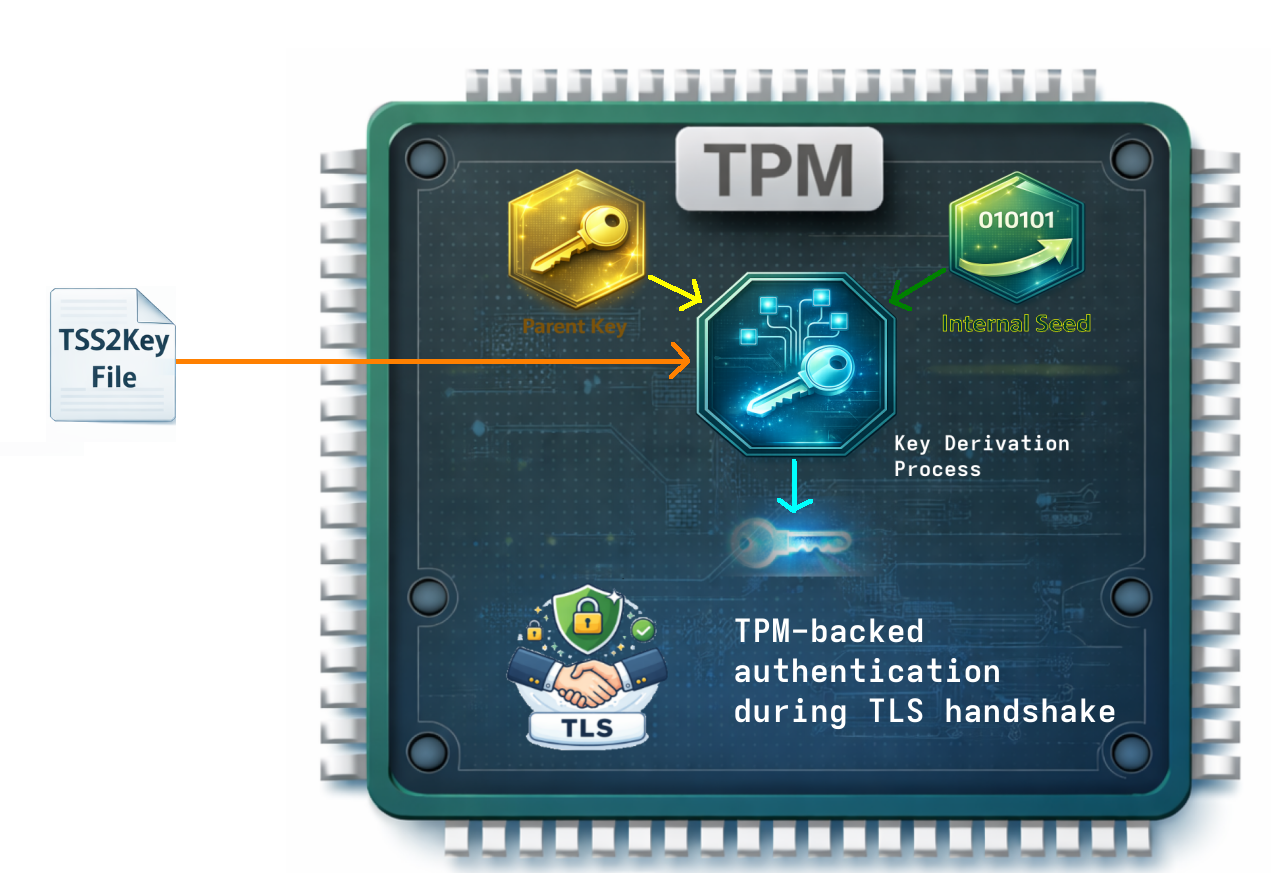
TSS2 private keys are managed through the TPM2 Software Stack (TSS2) and integrated with OpenSSL.
When creating such a key:
- The TPM generates the key internally.
- A key file is created on the filesystem. It contains
- a sealed key blob
- public key
- metadata
- The sealed key blob can only be decrypted with
- a parent key
- TPM internal seeds
- The private key itself never leaves the TPM.
If this file is copied to another machine or device, it will not work - because it is bound to the original TPM.
Advantages:
- Works with both C/C++ and Python (via OpenSSL integration)
- No need to manage numeric TPM handles manually
- No practical limitation on the number of keys
- Clean integration into OpenSSL workflows
One limitation:
It is specific to OpenSSL-based environments.
A Word on Manufacturing and Key Deployment
When designing a secure embedded system, the most critical question is often not "How do I store my private key?" but rather "How do I provision it without trusting the entire manufacturing chain?"
If private keys are generated externally and injected during production, your security model implicitly trusts factory infrastructure and personnel. A TPM removes that assumption by enabling on-device key generation - ensuring the private key never exists outside the hardware boundary.
To better understand what that means in practice, let's look at some potential manufacturing scenarios and how they differ in terms of security and operational complexity.
Scenario 1 – One Private Key Generated Offline
A simple approach:
- Generate a private key once (offline).
- Create a CSR and obtain a certificate from the CA.
- Flash the certificate during manufacturing.
- Import the private key into the TPM during manufacturing.
- Optionally generate a TSS2 key.
Problems:
- All devices share the same private key.
- If the key leaks (for example, in the factory), all devices are compromised.
- The private key must be handled during manufacturing.
- The device must boot to import the key.
The fundamental question becomes:
Do you fully trust your manufacturing process?
Scenario 2 – Individual Keys Generated Offline
Each device receives a unique private key during manufacturing. Otherwise the process remains the same.
Advantages:
- If one key leaks, only one device is affected.
- Revocation is possible per device.
However:
- The private key still exists outside the device at some point.
- Manufacturing must securely handle large numbers of keys.
If your manufacturing chain is not fully trusted, this remains a risk.
Scenario 3 – Let the TPM Generate the Private Key
This is the most secure approach.
- Flash the filesystem (no keys included).
- On first boot, instruct the TPM to generate a private key:
- Either as a persistent handle
- Or as a TSS2 private key
- Create a CSR based on the TPM-backed key.
- Send the CSR to your CA and receive a certificate.
- Store the certificate on the filesystem.
The key advantage:
The raw private key is never visible outside the TPM — not even during manufacturing.
Even factory personnel cannot extract it.
Putting It All Together
We have now explored:
- Why filesystem-based private keys are risky
- How TPMs protect private keys from extraction
- Integration approaches (persistent handles vs. TSS2 keys)
- Manufacturing implications
In the next part, we will move from theory to practice:
- 👉 Part 5 – Python implementation using TSS2 keys
- 👉 Part 6 – C implementation using persistent handles or TSS2 keys
Now we will actually use the TPM in our client/server application.