UART
UART Overview
UART Overview
The DART-MX91 exposes up to seven LPUART interfaces, some of which are multiplexed with other peripherals.
| Serial Port | Device Node | Device Tree | DART-MX91 on DT8MCustomBoard/Sonata-Board |
|---|---|---|---|
| UART0 | /dev/ttyLP0 | lpuart1 | DT8MCustomBoard/Sonata-Board serial console |
| UART2 | /dev/ttyLP2 | lpuart3 | Disabled by default, see datasheet |
| UART3 | /dev/ttyLP3 | lpuart4 | Disabled by default, see datasheet |
| UART4 | /dev/ttyLP4 | lpuart5 | 1.8V Signal level, used on SOM for Bluetooth interface and can be accessible only if Bluetooth is disabled. [1] |
| UART5 | /dev/ttyLP5 | lpuart6 | Connected to J12.4 and J12.6 on DT8MCustomboard/to J6.4 and J6.6 on Sonata-Board |
| UART6 | /dev/ttyLP6 | lpuart7 | Connected to J12.11 and J12.13 on DT8MCustomboard only |
| UART7 | /dev/ttyLP7 | lpuart8 | Disabled by default, see datasheet |
Disabling Bluetooth / Enabling UART4 (/dev/ttyLP4)
UART4/ttyLP4 is used by the Bluetooth on the SOM. To use it on the carrier, Bluetooth must be disabled on the SOM.
First, disable variscite-bt by running:
# systemctl stop variscite-bt; systemctl stop variscite-ot
# systemctl disable variscite-bt; systemctl disable variscite-ot
Then, disable bluetooth in the device tree imx91-var-dart.dtsi:
Testing UART5
The following demonstrates how to test UART5 on the DART-MX91 and Sonata-Board.
Short J6.4 and J6.6 pins and run the following commands:
For each invocation of echo command the "hello" string should appear on the terminal.
Testing UART6
The following demonstrates how to test UART6 on the DART-MX91 and DT8MCustomBoard only.
Short J12.11 and J12.13 pins and run the following commands:
For each invocation of echo command the "hello" string should appear on the terminal.
Disabling UART5
To disable UART5 edit arch/arm64/boot/dts/freescale/imx91-var-dart-dt8mcustomboard.dtsi in the kernel source directory and modify
to
Other UARTs can be disabled in a similar manner by referencing the table above.
Configuring RS485 Half-Duplex
The i.MX91 supports controlling an rs485 transceiver's driver enable signal via RTS_B signal. For more details, please refer to 47.3.4.4 Transceiver driver enable using RTS_B of the i.MX 91 Applications Processor Reference Manual.
RS485 is enabled in software by:
- Enabling the RTS pin in the device tree.
- Enabling RS485 in the serial driver.
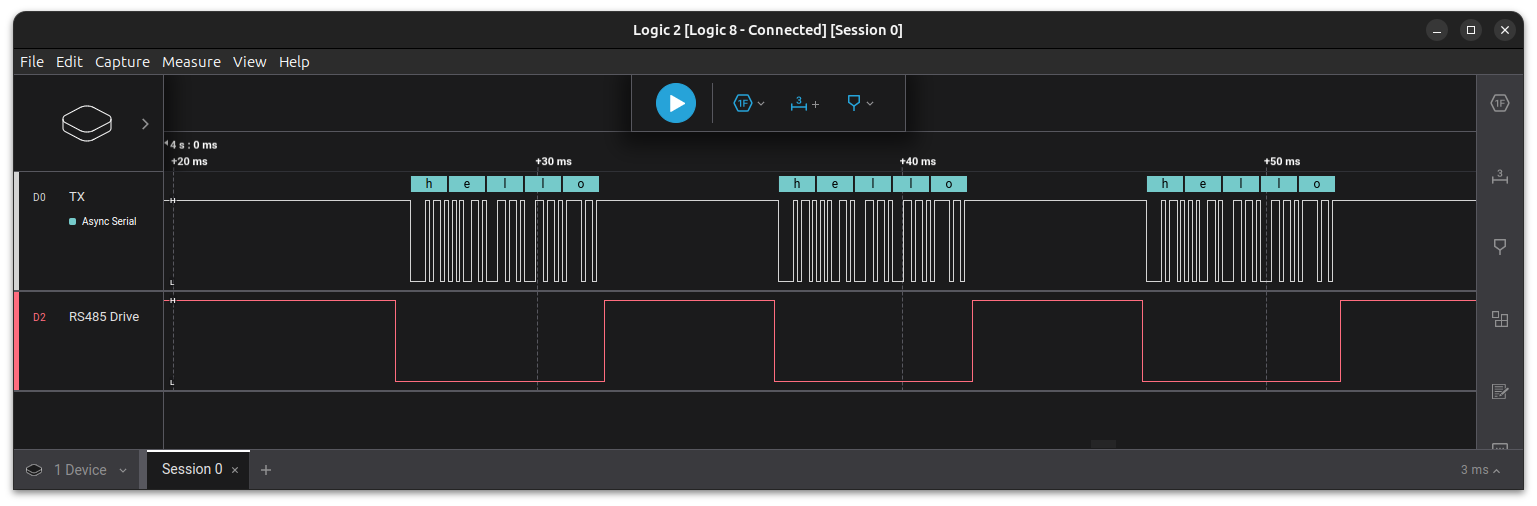
The example below demonstrates how to do this on the DART-MX91 and Sonata-Board using /dev/ttyLP4 on J6.1 (TX), J6.5 (RX) and J6.7 (RTS_B).
The signals can be accessible only if Bluetooth is disabled. See Disabling Bluetooth / Enabling UART4 (/dev/ttyLP4)
After booting the updated device tree, use the following python script to test RS485:
import sys
import serial
import serial.rs485
import time

def configure_rs485(port, data):
    try:
        # Open the serial port
        ser = serial.Serial(port, baudrate=9600)

        # Configure RS485
        ser.rs485_mode = serial.rs485.RS485Settings(
            delay_before_tx=0,
            delay_before_rx=0,
            rts_level_for_tx=False,  # RTS is low during transmission
            rts_level_for_rx=True,   # RTS is high during reception
            loopback=False
        )

        # Write data to the port three times with a delay of 10ms between each
        for _ in range(3):
            ser.write(data.encode())
            time.sleep(0.01)  # 10ms delay

        # Close the serial port
        ser.close()

        print("Data sent successfully.")

    except Exception as e:
        print(f"Error: {str(e)}")

if __name__ == "__main__":
    if len(sys.argv) != 3:
        print("Usage: python3 rs485.py <port> <data>")
    else:
        port = sys.argv[1]
        data = sys.argv[2]
        configure_rs485(port, data)
Finally, install pyserial and run the script:
root@imx91-var-som:~# pip3 install pyserial
root@imx91-var-som:~# python3 rs485.py /dev/ttyLP4 "hello"
The following image was captured on a logic analyzer using this example: