GPIO
GPIO state
Note: The GPIO assignments displayed below are for reference purposes and may differ slightly from release to release.
The current state of the system's GPIOs can be obtained in user-mode, as shown in the following example:
# cat /sys/kernel/debug/gpio
gpiochip4: GPIOs 303-310, parent: i2c/0-0020, 0-0020, can sleep:
 gpio-303 (                    |Heartbeat           ) out lo
 gpio-304 (                    |Back                ) in  hi IRQ ACTIVE LOW
 gpio-305 (                    |Home                ) in  hi IRQ ACTIVE LOW
 gpio-306 (                    |Menu                ) in  hi IRQ ACTIVE LOW
 gpio-307 (                    |usb3_sel            ) out lo
 gpio-308 (                    |PHY reset           ) out hi ACTIVE LOW
 gpio-309 (                    |eth-vselect         ) out lo
 gpio-310 (                    |eth-mdio-enable     ) out hi

gpiochip3: GPIOs 311-398, parent: platform/601000.gpio, 601000.gpio:
 gpio-323 (                    |id                  ) in  hi

gpiochip2: GPIOs 399-485, parent: platform/600000.gpio, 600000.gpio:
 gpio-409 (                    |powerdown           ) out lo
 gpio-420 (                    |ov5640-buf-en       ) out lo ACTIVE LOW
 gpio-421 (                    |reset               ) out lo ACTIVE LOW
 gpio-429 (                    |regulator-3         ) out lo
 gpio-444 (                    |regulator-8         ) out hi
 gpio-445 (                    |PHY reset           ) out hi ACTIVE LOW
 gpio-455 (                    |SD_voltage_sel      ) out lo

gpiochip1: GPIOs 486-509, parent: platform/4201000.gpio, 4201000.gpio:

gpiochip0: GPIOs 510-511, parent: platform/3b000000.memory-controller, omap-gpmc:
Each GPIO is defined as in or out and the state is shown as lo or hi.
For example pin 304 is the Back button.
When the Back button is not pressed, the state will be:
When the Back button is pressed, the state will be:
Manipulating GPIO using libgpiod
libgpiod provides bindings and utilities for for manipulating GPIO via user space.
libgpiod via command line
libgpiod provides command line utilities for GPIO:
| gpiodetect | List all gpiochips present on the system, their names, labels and number of GPIO lines |
| gpioinfo | List all lines of specified gpiochips, their names, consumers, direction, active state and additional flags |
| gpioget | Read values of specified GPIO lines |
| gpioset | Set values of specified GPIO lines, potentially keep the lines exported and wait until timeout, user input or signal |
| gpiofind | Find the gpiochip name and line offset given the line name |
| gpiomon | Wait for events on GPIO lines, specify which events to watch, how many events to process before exiting or if the events should be reported to the console |
The AM625 GPIOs exist in two domains, the MAIN domain and the MCU domain.
The MAIN domain includes two General Purpose Input/Output (GPIO) modules that provide dedicated general-purpose pins that can be configured as either inputs or outputs. The GPIO modules main features include:
- Support of 9 banks x 16 GPIO pins
- Support of up to 9 banks of interrupt capable GPIOs
- Interrupts can be triggered by rising and/or falling edge, specified for each interrupt capable GPIO pin
- Set/clear functionality per individual GPIO pin
The MCU domain includes one General Purpose Input/Output (MCU_GPIO) module provides dedicated general-purpose pins that can be configured as either inputs or outputs. the MCU_GPIO module includes thesemain features:
- Support of 9 banks x 16 GPIO pins
- Support of up to 9 banks of interrupt capable GPIOs
- Interrupts can be triggered by rising and/or falling edge, specified for each interrupt capable GPIO pin
- Set/clear functionality per individual GPIO pin
Each module corresponds to a character device /dev/gpiochip<bank index>. The gpiodetect utility can be used to inspect the available gpiochip character devices:
# gpiodetect
gpiochip0 [omap-gpmc] (2 lines)
gpiochip1 [4201000.gpio] (24 lines)
gpiochip2 [600000.gpio] (87 lines)
gpiochip3 [601000.gpio] (88 lines)
gpiochip4 [0-0020] (8 lines)
These can be mapped to the device tree:
| gpiochip | devicetree | address |
|---|---|---|
| omap-gpmc | gpmc0 | 0x3b000000 |
| gpiochip1 | mcu_gpio0 | 0x4201000 |
| gpiochip2 | main_gpio0 | 0x600000 |
| gpiochip3 | main_gpio1 | 0x601000 |
| gpiochip4 | pca9534 | i2c0@20 |
The gpioinfo utility can be used to inspect the lines for a given gpiochip:
# gpioinfo gpiochip2
gpiochip2 - 87 lines:
       line   0:      unnamed       unused   input  active-high
       line   1:      unnamed       unused   input  active-high
       line   2:      unnamed       unused   input  active-high
        ...
The gpioset and gpioget utilities can be used to manipulate GPIO from the command line.
For example, assuming GPIO1_4 (gpiochip3 and main_gpio1 in the device tree) is configured as a GPIO in your device tree:
Set GPIO1_4 high:
Set GPIO1_4 low:
Read GPIO1_4:
libgpiod C Application
libgpiod provides bindings for C/C++ applications. C++ examples are available in the libgpiod /tree/bindings/cxx/examples directory.
Below is a simple C application demonstrating how to use the bindings with GPIO4_IO21:
Makefile:
main.c
#include <gpiod.h>
#include <stdio.h>
#include <unistd.h>
#include <stdlib.h>
#include <string.h>

#define    CONSUMER    "Variscite Demo"

int main(int argc, char **argv)
{
    unsigned int i, ret, val;
    struct gpiod_chip *chip;
    struct gpiod_line *line;
    const char * chipname = "gpiochip3";
    const unsigned int line_num = 21;

    chip = gpiod_chip_open_by_name(chipname);
    if (!chip) {
        perror("Open chip failed\n");
        goto end;
    }

    line = gpiod_chip_get_line(chip, line_num);
    if (!line) {
        perror("Get line failed\n");
        goto close_chip;
    }

    ret = gpiod_line_request_output(line, CONSUMER, 0);
    if (ret < 0) {
        perror("Request line as output failed\n");
        goto release_line;
    }

    /* Blink 5 times */
    val = 0;
    for (i = 0; i < 5; i++) {
        ret = gpiod_line_set_value(line, val);
        if (ret < 0) {
            perror("Set line output failed\n");
            goto release_line;
        }
        printf("Output %u on line #%u\n", val, line_num);
        sleep(1);
        val = !val;
    }

release_line:
    gpiod_line_release(line);
close_chip:
    gpiod_chip_close(chip);
end:
    return 0;
}
libgpiod Python Application
libgpiod provides bindings for Python applications.
Recommended (Debian/apt):
Alternative (venv + pip):
# apt update
# apt install python3-venv
# python3 -m venv /opt/gpio-venv
# . /opt/gpio-venv/bin/activate
# pip install gpiod
Python examples are available in the libgpiod /tree/bindings/python/examples directory.
Kernel Device Tree GPIO configuration
SysConfig Device Tree Generation
TI's SysConfig provides an intuitive graphical user interface for configuring pins, including pin mux and pad settings: https://www.ti.com/tool/SYSCONFIG.
As shown in the image below, SysConfig enables you to select the GPIO pin(s) for your design and will then generate the device tree code:
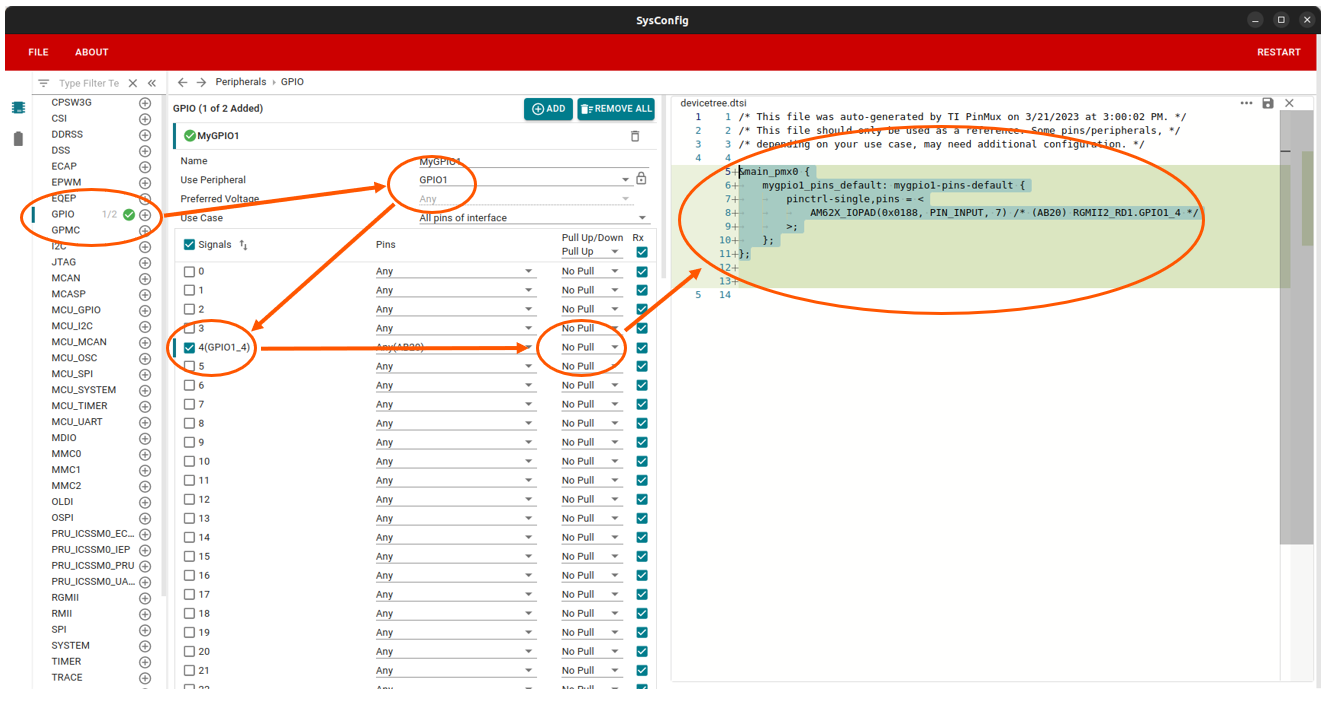
Define a pin as GPIO in the kernel Device Tree
The device tree code generated by SysConfig can be copied directly to your device tree file. Generally, GPIO will be used by another device node and you will provide it the mygpio1_pins_default handle. However, if the GPIO is not used by another device and you wish to control it using libgpiod, you need to initialize the pin configuration like shown below: