Streaming Video
Introduction to GStreamer
GStreamer is a powerful pipeline-based multimedia framework.
It allows programmers to create a variety of media-handling components, including simple audio playback, audio and video playback, recording, streaming and editing.
This is not a GStreamer reference manual but an overview for using it on the Variscite i.MX6 products.
This release uses the gstreamer-imx set of GStreamer 1.0 plugins for Freescale's i.MX platform, which make use of the i.MX multimedia capabilities.
Major GStreamer commands
There are two major commands:
gst-inspect - allows you to to get documentation on available elements and detailed information on a specific element.
gst-launch - allows you to create and execute GStreamer pipelines.
gst-inspect
Lists all available elements:
Lists all available i.MX6 specific elements:
For example:
root@var-som-mx6:~# gst-inspect-1.0 | grep imx
imxipu:  imxipuvideotransform: Freescale IPU video transform
imxipu:  imxipuvideosink: Freescale IPU video sink
imxipu:  imxipucompositor: Freescale IPU video compositor
imxg2d:  imxg2dvideosink: Freescale G2D video sink
imxg2d:  imxg2dvideotransform: Freescale G2D video transform
imxg2d:  imxg2dcompositor: Freescale G2D video compositor
imxpxp:  imxpxpvideosink: Freescale PxP video sink
imxpxp:  imxpxpvideotransform: Freescale PxP video transform
imxaudio:  imxuniaudiodec: Freescale i.MX uniaudio decoder
imxaudio:  imxmp3audioenc: Freescale i.MX MP3 encoder
imxeglvivsink:  imxeglvivsink: Freescale EGL video sink
imxvpu:  imxvpudec: Freescale VPU video decoder
imxvpu:  imxvpuenc_h263: Freescale VPU h.263 video encoder
imxvpu:  imxvpuenc_h264: Freescale VPU h.264 video encoder
imxvpu:  imxvpuenc_mpeg4: Freescale VPU MPEG-4 video encoder
imxvpu:  imxvpuenc_mjpeg: Freescale VPU motion JPEG video encoder
imxv4l2videosrc:  imxv4l2videosrc: V4L2 CSI Video Source
Detailed help information on a specific element:
For example:
root@var-som-mx6:~# gst-inspect-1.0 imxeglvivsink
====== IMXV4L2SINK: 4.0.9 build on Aug  8 2016 12:47:08. ======
Factory Details:
  Rank                     primary + 1 (257)
  Long-name                Freescale EGL video sink
  Klass                    Sink/Video
  Description              Video output using the i.MX6 Vivante GPU
  Author                   Carlos Rafael Giani <[email protected]>

Plugin Details:
  Name                     imxeglvivsink
  Description              EGL/GLES sink using Vivante direct textures
  Filename                 /usr/lib/gstreamer-1.0/libgstimxeglvivsink.so
  Version                  0.12.2
  License                  LGPL
  Source module            gstreamer-imx
  Binary package           Unknown package release
  Origin URL               Unknown package origin

GObject
 +----GInitiallyUnowned
       +----GstObject
             +----GstElement
                   +----GstBaseSink
                         +----GstVideoSink
                               +----GstImxEglVivSink

Implemented Interfaces:
  GstNavigation
  GstVideoOverlay

Pad Templates:
  SINK template: 'sink'
    Availability: Always
    Capabilities:
      video/x-raw
                 format: { I420, YV12, YV21, NV12, NV21, UYVY, RGB16, RGBA, BGRA, RGBx, BGRx, BGR, ARGB, ABGR, xRGB, xBGR }
                  width: [ 1, 2147483647 ]
                 height: [ 1, 2147483647 ]
              framerate: [ 0/1, 2147483647/1 ]


Element Flags:
  no flags set

Element Implementation:
  Has change_state() function: gst_imx_egl_viv_sink_change_state

Element has no clocking capabilities.
Element has no URI handling capabilities.

Pads:
  SINK: 'sink'
    Pad Template: 'sink'

Element Properties:
  name                : The name of the object
                        flags: readable, writable
                        String. Default: "imxeglvivsink0"
  parent              : The parent of the object
                        flags: readable, writable
                        Object of type "GstObject"
  sync                : Sync on the clock
                        flags: readable, writable
                        Boolean. Default: true
  max-lateness        : Maximum number of nanoseconds that a buffer can be late before it is dropped (-1 unlimited)
                        flags: readable, writable
                        Integer64. Range: -1 - 9223372036854775807 Default: 20000000
  qos                 : Generate Quality-of-Service events upstream
                        flags: readable, writable
                        Boolean. Default: true
  async               : Go asynchronously to PAUSED
                        flags: readable, writable
                        Boolean. Default: true
  ts-offset           : Timestamp offset in nanoseconds
                        flags: readable, writable
                        Integer64. Range: -9223372036854775808 - 9223372036854775807 Default: 0
  enable-last-sample  : Enable the last-sample property
                        flags: readable, writable
                        Boolean. Default: true
  last-sample         : The last sample received in the sink
                        flags: readable
                        Boxed pointer of type "GstSample"
  blocksize           : Size in bytes to pull per buffer (0 = default)
                        flags: readable, writable
                        Unsigned Integer. Range: 0 - 4294967295 Default: 4096
  render-delay        : Additional render delay of the sink in nanoseconds
                        flags: readable, writable
                        Unsigned Integer64. Range: 0 - 18446744073709551615 Default: 0
  throttle-time       : The time to keep between rendered buffers (0 = disabled)
                        flags: readable, writable
                        Unsigned Integer64. Range: 0 - 18446744073709551615 Default: 0
  max-bitrate         : The maximum bits per second to render (0 = disabled)
                        flags: readable, writable
                        Unsigned Integer64. Range: 0 - 18446744073709551615 Default: 0
  show-preroll-frame  : Whether to render video frames during preroll
                        flags: readable, writable
                        Boolean. Default: true
  fullscreen          : Whether or not to set the created window to fullscreen mode (ignored if application provides a window handle)
                        flags: readable, writable
                        Boolean. Default: false
  force-aspect-ratio  : When enabled, scaling will respect original aspect ratio
                        flags: readable, writable
                        Boolean. Default: true
  native-display      : String identifying the display to use (default value uses the default display)
                        flags: readable, writable
                        String. Default: null
  window-x-coord      : X coordinate of the window's top left corner, in pixels
                        flags: readable, writable
                        Integer. Range: -2147483648 - 2147483647 Default: 0
  window-y-coord      : Y coordinate of the window's top left corner, in pixels
                        flags: readable, writable
                        Integer. Range: -2147483648 - 2147483647 Default: 0
  window-width        : Window width, in pixels (0 = automatically set to the video input width)
                        flags: readable, writable
                        Unsigned Integer. Range: 0 - 2147483647 Default: 0
  window-height       : Window height, in pixels (0 = automatically set to the video input height)
                        flags: readable, writable
                        Unsigned Integer. Range: 0 - 2147483647 Default: 0
  borderless-window   : Disable window borders, bypassing any window manager
                        flags: readable, writable
                        Boolean. Default: false
gst-launch
For Example, display a test pattern on the monitor:
i.MX6 major elements
|
Prefix
|
Element Name
|
description
|
|---|---|---|
| imxaudio | imxmp3audioenc | imx mp3 audio encoder |
| imxg2d | imxg2dvideosink | IMX G2D video sink ( blitter-based , zerocopy ) |
| imxipu | imxipuvideosink | IMX IPU video sink ( blitter-based , zerocopy ) |
| imxpxp | imxpxpvideosink | IMX PxP video sink ( blitter-based , zerocopy ) |
| imxeglvivsink | imxeglvivsink | IMX EGL video sink ( zerocopy ) |
| imxv4l2videosrc | imxv4l2videosrc | IMX V4L2 CSI Video Source ( zerocopy ) |
| imxvpu | imxvpudec | IMX VPU video decoder ( zerocopy ) |
| imxvpu | imxvpuenc_h263 | VPU-based h.263 video encoder ( zerocopy ) |
| imxvpu | imxvpuenc_h264 | VPU-based H264 video encoder ( zerocopy ) |
| imxvpu | imxvpuenc_mpeg4 | VPU-based MPEG-4 video encoder ( zerocopy ) |
| imxvpu | imxvpuenc_jpeg | VPU-based JPEG video encoder ( zerocopy ) |
| imxipu | imxipuvideotransform | IMX IPU video transform |
| imxpxp | imxpxpvideotransform | IMX PXP video transform |
| imxg2d | imxg2dvideotransform | IMX G2D video transform |
| imxipu | imxipucompositor | IMX IPU video compositor |
| imxg2d | imxg2dcompositor | IMX G2D video compositor |
Only imxeglvivsink will work with X11 or Wayland. More optimized blitter-base PXP, IPU and G2D sinks will work with fslc_framebuffer only
See more detailed description here
Test Pattern Stream
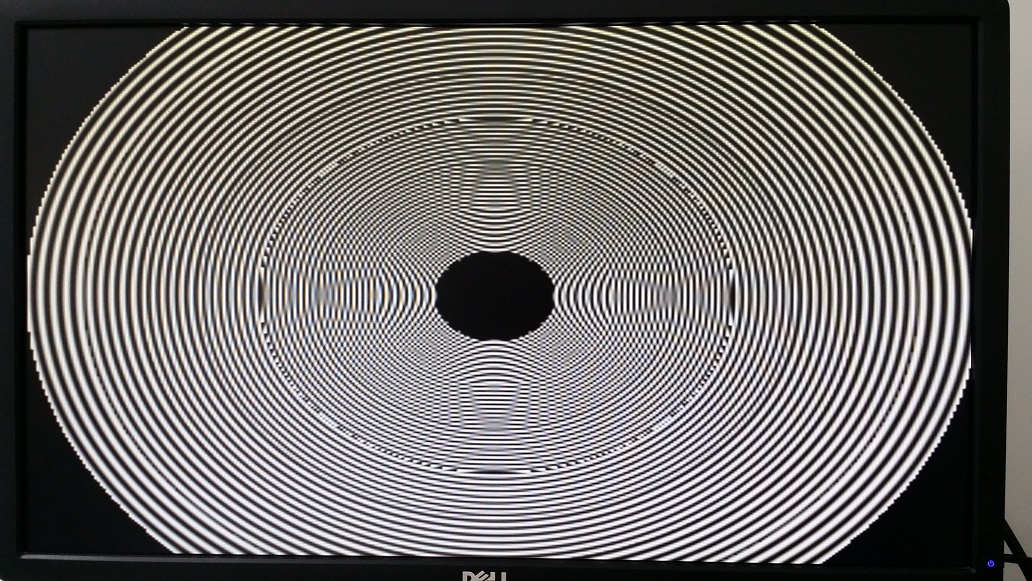
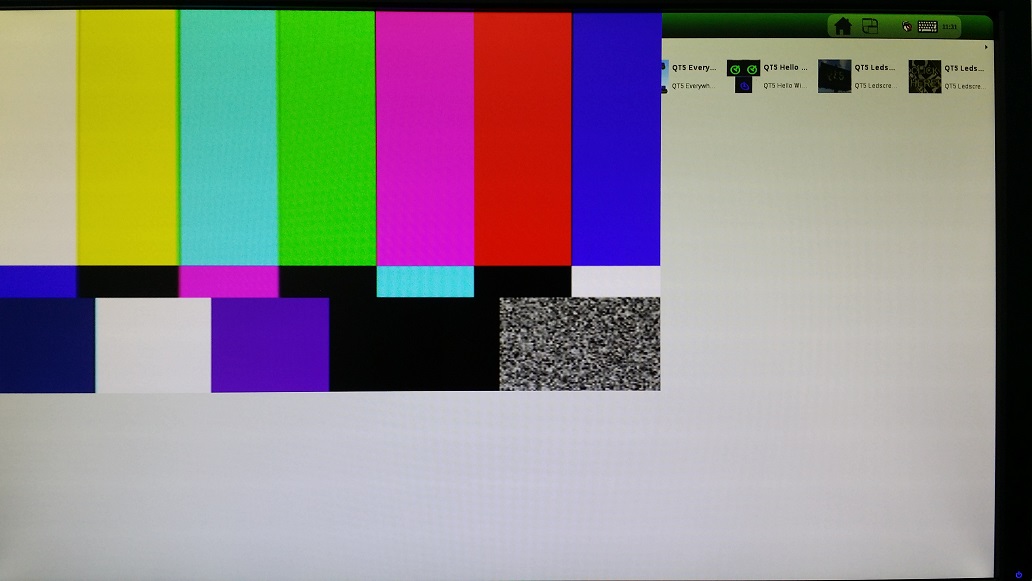
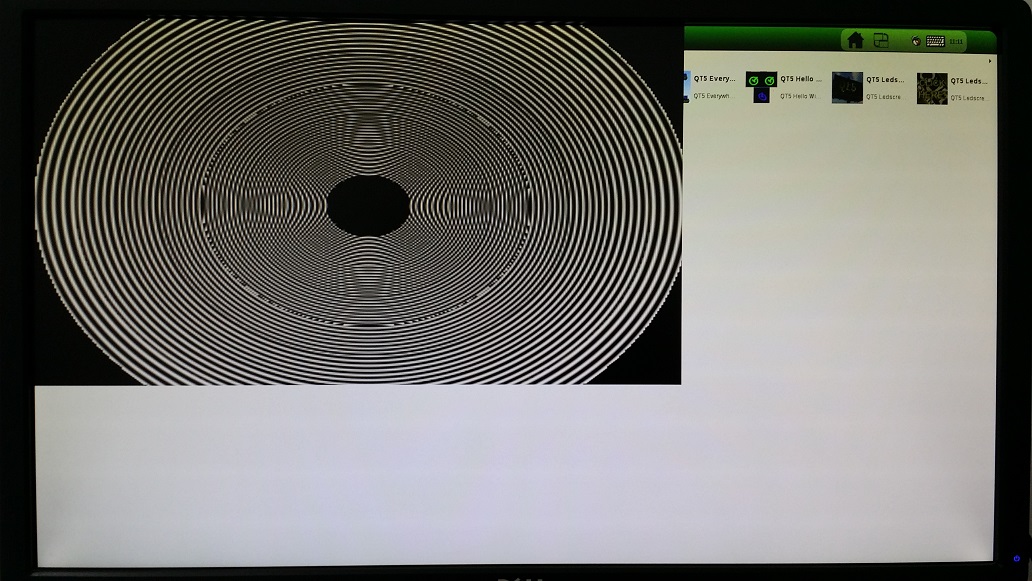
Test pattern allows you to display pre build image/video patterns on the display. It is very useful when you don't have a camera but still want to test GStreamer.
Default test pattern:

Test pattern with specific paramters on the input element
$ gst-launch-1.0 videotestsrc pattern=circular ! imxeglvivsink borderless-window="true" force-aspect-ratio="false"
Test pattern with specific paramters on the output element
$ gst-launch-1.0 videotestsrc ! imxeglvivsink window-width="1280" window-height="720" borderless-window="true" force-aspect-ratio="false"
Test pattern with specific paramters on the input and output elements
$ gst-launch-1.0 videotestsrc pattern=circular ! imxeglvivsink window-width="1280" window-height="720" borderless-window="true" force-aspect-ratio="false"
Camera Loopback
- Stream video from a camera to a display:
$ gst-launch-1.0 imxv4l2videosrc device=/dev/video0 imx-capture-mode=5 fps-n=30 ! imxeglvivsink window-width="1920" window-height="1080" borderless-window="true" force-aspect-ratio="false"
Only imxeglvivsink will work with X11 or Wayland with some rendering artifacts.
More optimized blitter-base imxg2dvideosink and imxipuvideosink sinks will properly work with fslc_framebuffer DISTRO only
Get the camera support format and resolution using gst-inspect-1.0 imxv4l2videosrc.
imx-capture-mode for ov5640 example resolutions:
ov5640_mode_VGA_640_480 = 0,
ov5640_mode_QVGA_320_240 = 1,
ov5640_mode_NTSC_720_480 = 2,
ov5640_mode_PAL_720_576 = 3,
ov5640_mode_720P_1280_720 = 4,
ov5640_mode_1080P_1920_1080 = 5
- And another pipeline example, the same as above, only with camera continuous auto focus enabled:
$ gst-launch-1.0 imxv4l2videosrc device=/dev/video0 imx-capture-mode=5 fps-n=30 focus-mode=6 ! imxeglvivsink window-width="1920" window-height="1080" borderless-window="true" force-aspect-ratio="false"
Video Record
command:
gst-launch-1.0 imxv4l2videosrc device=\(DEVICE num-buffers=300 imx-capture-mode=\)MODE ! queue ! imxvpuenc_XXX ! \(MUXER ! filesink location=output.\)EXTENSION
- Parameter comments:
-
• $DEVICE could be set to /dev/video, /dev/video0 or according to the system video input device.
-
• num-buffers - Number of buffers to output before sending EOS. deafult =-1 (unlimited)
-
• $MODE should be set according to camera format and resolution
-
• imxvpuenc_XXX can be imxvpuenc_mpeg4,imxvpuenc_h263, imxvpuenc_h264, and imxvpuenc_jpeg
-
• MUXER can be set as to qtmux, matroskamux, mp4mux, avimux, or flvmux
-
• EXTENSION is filename extension according to the muxer type.
Record video from a camera into a file.
Encode it to h264 at a bitrate of 10mbit/s (CBR)
720p:
$ gst-launch-1.0 imxv4l2videosrc device=/dev/video0 imx-capture-mode=4 fps-n=30 num-buffers=300 ! queue ! imxvpuenc_h264 bittrate=10000 ! avimux ! filesink location=test.avi
1080p:
$ gst-launch-1.0 imxv4l2videosrc device=/dev/video0 imx-capture-mode=5 fps-n=30 num-buffers=300 ! queue ! imxvpuenc_h264 bitrate=10000 ! avimux ! filesink location=test.avi
To use ov5640 continuous auto focus while recording video to a file append focus-mode=6 to imxv4l2videosrc
For example
720p:
$ gst-launch-1.0 imxv4l2videosrc device=/dev/video0 imx-capture-mode=4 fps-n=30 num-buffers=300 focus-mode=6 ! queue ! imxvpuenc_h264 bittrate=10000 ! avimux ! filesink location=test.avi
1080p:
$ gst-launch-1.0 imxv4l2videosrc device=/dev/video0 imx-capture-mode=5 fps-n=30 num-buffers=300 focus-mode=6 ! queue ! imxvpuenc_h264 bitrate=10000 ! avimux ! filesink location=test.avi
Simple Movie Play
Compositing
The compositor is a new feature in gstreamer-imx 0.11.0. Just like with the compositor from gst-plugins-base 1.5.1 and newer, compositor elements support an arbitrary number of request sink pads, and one srcpad.
$ gst-launch-1.0   \
  imxg2dcompositor name=c background-color=0x223344 \
      sink_0::xpos=0 sink_0::ypos=90 sink_0::width=160 sink_0::height=110 sink_0::zorder=55 sink_0::fill_color=0xff00ff00 sink_0::alpha=0.39 sink_0::rotation=0 \
      sink_1::xpos=0 sink_1::ypos=20 sink_1::width=620 sink_1::height=380 sink_1::fill_color=0x44441133 ! \
    queue2 ! "video/x-raw, width=800, height=600" ! imxg2dvideosink \
  videotestsrc pattern=0 ! "video/x-raw, framerate=30/1" ! c.sink_0 \
  videotestsrc pattern=18 ! "video/x-raw, framerate=30/1" ! c.sink_1
See detailed description here
References
- The GStreamer website
- The gstreamer-imx README
- The gstreamer-imx FAQ
- A Deep Dive into Image Processing for i.MX 6 Application Processors presentation