PCIE
Test for device
We are using Intel 7260 wireless device to test PCIE.
Check the bus:
$ dmesg | grep -i pcie
[    3.750038] imx6q-pcie 1ffc000.pcie: PCI host bridge to bus 0000:00
[    3.831355] pcieport 0000:00:00.0: Signaling PME through PCIe PME interrupt
[    3.837040] pci 0000:01:00.0: Signaling PME through PCIe PME interrupt
[    3.842274] pcie_pme 0000:00:00.0:pcie01: service driver pcie_pme loaded
[    3.842382] aer 0000:00:00.0:pcie02: service driver aer loaded
Serach for devices:
$ lspci
The output should look like:
00:00.0 PCI bridge: Device 16c3:abcd (rev 01)
01:00.0 Network controller: Intel Corporation PRO/Wireless 4965 AG or AGN [Kedron] Network Connection (rev 61)
Kernel configuration adding Intel 7260 device driver
Note: We assume that you are familiar with kernel manipulation. If not, please refer to the "Build the Linux kernel from source code" wiki page
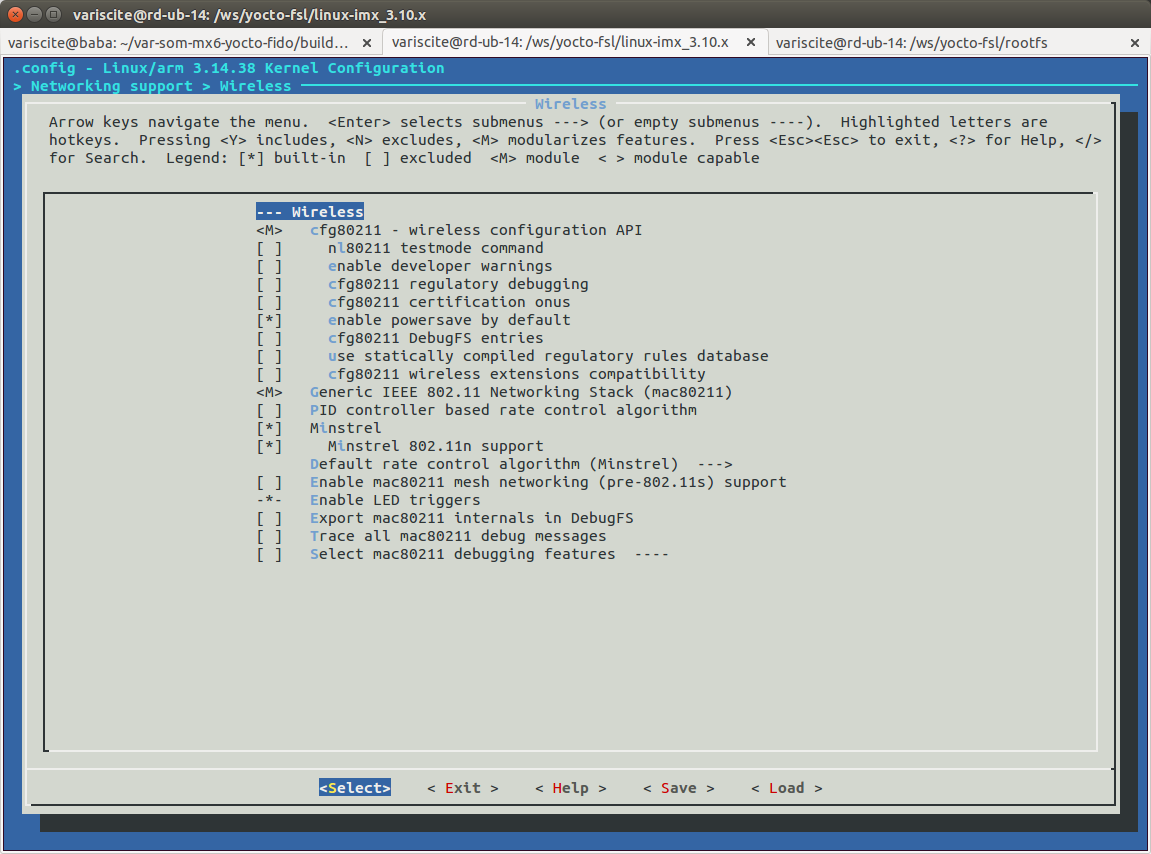
Configure wireless LAN support in Networking.
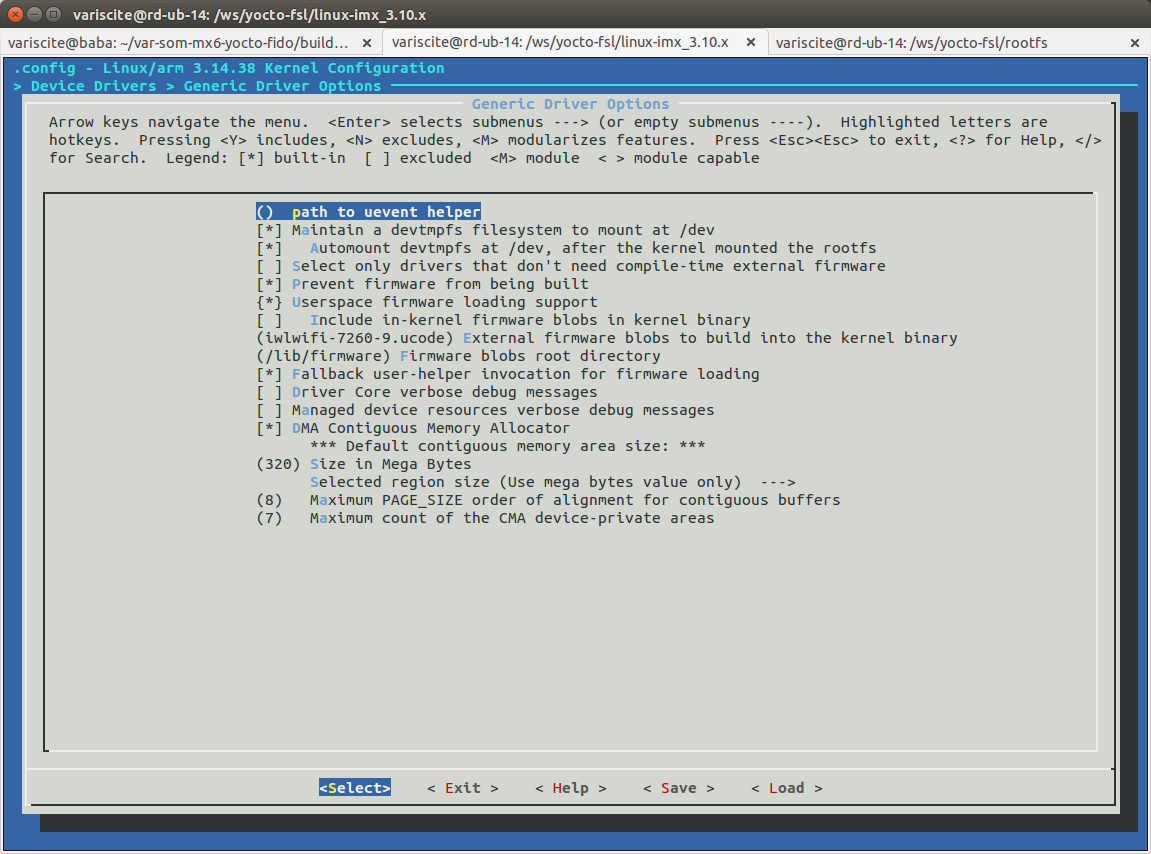
Configure general driver.
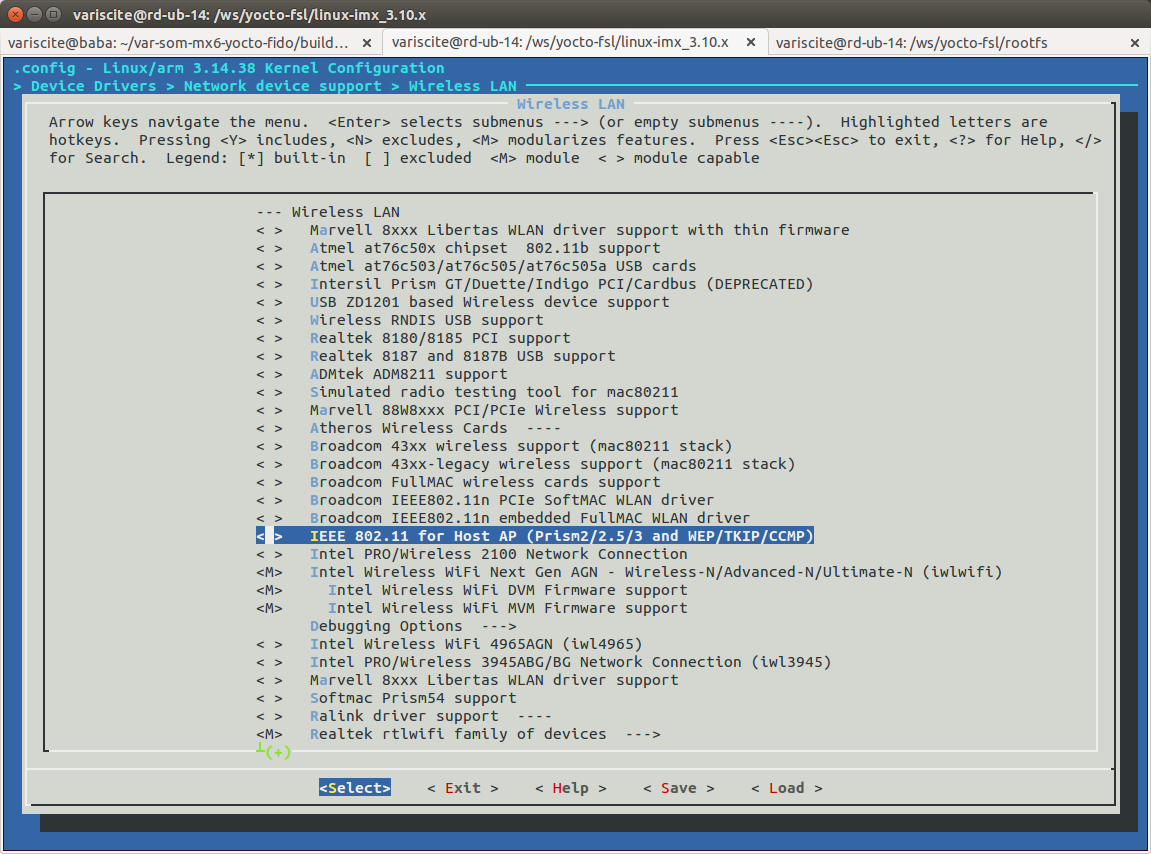
Configure Intel wireless LAN driver.
- Build the kernel and modules and install them to your target
- Copy the appropriate firmware to /lib/firmware/ on the rootfs of your target.
The firmware can be downloaded either from the iwlwifi Linux Wireless wiki page or from linux-firmware.git.
Make sure you get the one that matches your kernel version, or just copy all of them (iwlwifi-7260-*.ucode).
- Boot your target.
Testing on target
List drivers installed:
$ lsmod
Module                  Size  Used by
iwlmvm                121721  0
mac80211              282587  1 iwlmvm
iwlwifi                88161  1 iwlmvm
cfg80211              188042  3 iwlwifi,mac80211,iwlmvm
mxc_v4l2_capture       25117  1
ov5640_camera_mipi_int    23363  0
ipu_bg_overlay_sdc      5397  1 mxc_v4l2_capture
mxc_dcic                6569  0
ipu_still               2339  1 mxc_v4l2_capture
v4l2_int_device         2930  2 ov5640_camera_mipi_int,mxc_v4l2_capture
ipu_prp_enc             5903  1 mxc_v4l2_capture
ipu_csi_enc             3686  1 mxc_v4l2_capture
ipu_fg_overlay_sdc      6142  1 mxc_v4l2_capture
Look at the boot log for:
Intel(R) Wireless WiFi driver for Linux, in-tree:
Copyright(c) 2003- 2014 Intel Corporation
PCI: enabling device 0000:01:00.0 (0140 -> 0142)
iwlwifi 0000:01:00.0: loaded firmware version 25.228.9.0 op_mode iwlmvm
iwlwifi 0000:01:00.0: Detected Intel(R) Dual Band Wireless N 7260, REV=0x144
iwlwifi 0000:01:00.0: L1 Disabled - LTR Disabled
iwlwifi 0000:01:00.0: L1 Disabled - LTR Disabled
To list all available network interfaces:
If you have more than one wlan interface you can use the following commands to check which device corresponds to which interface:
The above commands will output the driver name and info for each interface. The Intel 7260 driver is iwlwifi.
Assuming the iwlwifi interface is wlan0, enable it:
$ ifconfig wlan0 up
iwlwifi 0000:01:00.0: L1 Disabled - LTR Disabled
iwlwifi 0000:01:00.0: L1 Disabled - LTR Disabled
IPv6: ADDRCONF(NETDEV_UP): wlan0: link is not ready

$ ifconfig
eth0      Link encap:Ethernet  HWaddr F8:DC:7A:04:89:67
          inet addr:192.168.1.130  Bcast:192.168.1.255  Mask:255.255.255.0
          inet6 addr: fe80::fadc:7aff:fe04:8967/64 Scope:Link
          UP BROADCAST RUNNING MULTICAST  MTU:1500  Metric:1
          RX packets:42483 errors:0 dropped:0 overruns:0 frame:0
          TX packets:31819 errors:0 dropped:0 overruns:0 carrier:0
          collisions:0 txqueuelen:1000
          RX bytes:47444269 (45.2 MiB)  TX bytes:4863615 (4.6 MiB)

lo        Link encap:Local Loopback
          inet addr:127.0.0.1  Mask:255.0.0.0
          inet6 addr: ::1/128 Scope:Host
          UP LOOPBACK RUNNING  MTU:65536  Metric:1
          RX packets:10 errors:0 dropped:0 overruns:0 frame:0
          TX packets:10 errors:0 dropped:0 overruns:0 carrier:0
          collisions:0 txqueuelen:0
          RX bytes:700 (700.0 B)  TX bytes:700 (700.0 B)

wlan0     Link encap:Ethernet  HWaddr 80:19:34:5C:D5:5A
          UP BROADCAST MULTICAST  MTU:1500  Metric:1
          RX packets:0 errors:0 dropped:0 overruns:0 frame:0
          TX packets:0 errors:0 dropped:0 overruns:0 carrier:0
          collisions:0 txqueuelen:1000
          RX bytes:0 (0.0 B)  TX bytes:0 (0.0 B)
Scan for access point: