VAR-SOM-MX7 - FreeRTOS for M4
Overview
The i.MX7 utilize both the ARM Cortex-A7 and Cortex-M4 cores for general-purpose programmable processing.
The dual-core architecture enables the device to run a rich operating system like Linux on the Cortex-A7 core and an RTOS like FreeRTOS on the Cortex-M4 core, to provide real-time responsiveness.
Multi-Core Architecture
The ARM Cortex-A7 and Cortex-M4 share the resources access using AHB/AXI buses.
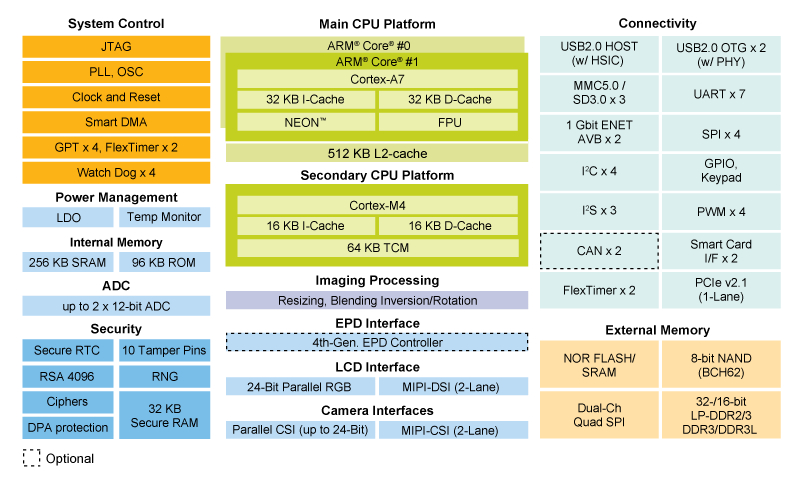
Please note that:
- Cortex-A7 always boots as the primary core.
- Cortex-M4 does not have a boot ROM and at POR is not provided a clock
- Cortex-A7 user code is responsible for the following:
- Loading and authenticating Cortex-M4 firmware by HAB API or with Cortex-A7 firmware together as a unified image by boot ROM.
- Launching the Cortex-M4 by enabling its clock and clearing its reset bit in System Reset Controller.
Further details are available in i.MX 7Dual Applications Processor Reference Manual
FreeRTOS BSP
The FreeRTOS BSP for i.MX 7Dual is a Software Development Kit that provides comprehensive software support for the i.MX 7Dual processor. The FreeRTOS BSP includes a set of peripheral drivers that aim at encapsulating peripheral register access and give users the maximum flexibility at same time, an open source event driven preemptive RTOS – FreeRTOS operating system (OS) and an open source multicore communication stack – RPMsg.
Demo and example applications are provided to demonstrate peripheral drivers, FreeRTOS kernel, RPMsg usage and to highlight the main features of the i.MX 7Dual processor. Next figure highlights the layers and features of the FreeRTOS BSP for i.MX 7Dual.
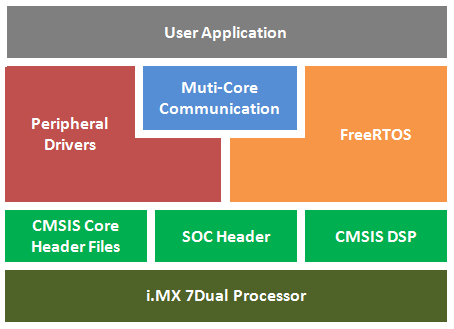
Here we describe how to use ARM GCC toolchain, but also DS-5 an IAR are officially supported following Getting Started with FreeRTOS BSP for i.MX 7Dual.
Prerequisites
Before starting, prepare a Yocto boot SD (Morty or newer).
Installing required packages
Download and install GNU-ARM bare-metal toolchain:
mkdir ~/var-som-mx7_m4-freertos
cd ~/var-som-mx7_m4-freertos
wget https://developer.arm.com/-/media/Files/downloads/gnu-rm/5_4-2016q3/gcc-arm-none-eabi-5_4-2016q3-20160926-linux.tar.bz2
tar xvf gcc-arm-none-eabi-5_4-2016q3-20160926-linux.tar.bz2
Download FreeRTOS BSP for the SOM:
cd ~/var-som-mx7_m4-freertos
git clone https://github.com/varigit/freertos-variscite.git -b freertos_bsp_1.0.1_imx7d-var01
cd freertos-variscite
Documentation
Original NXP documentation is available online or in the following folder:
Available demos
All of the Variscite examples are located under the following folder
Default M4 pin settings are used by demo applications:
| function | pin |
|---|---|
| debug UART (UART2) | RX: J5.5 / TX: J5.7 |
| Button (BACK) | SW3 (GPIO1_IO11) |
| LED | D10 (GPIO1_IO13) |
| CAN (CAN2) | J14.1-2 |
| I2C (I2C2) | SCL: J14.7 / SDA: J14.9 |
| ECSPI (ECSPI2) | SCLK: J10.3 / MISO: J10.5 / MOSI J10.7 / CS0 J10.9 |
The available demos for VAR-SOM-MX7 are
| path | memory type |
|---|---|
| demo_apps/blinking_imx_demo | TCM |
| demo_apps/hello_world | TCM |
| demo_apps/hello_world_ddr | DDR |
| demo_apps/hello_world_ocram | OCRAM |
| demo_apps/low_power_imx7d/rand_wfi | TCM |
| demo_apps/rpmsg/pingpong_bm | TCM |
| demo_apps/rpmsg/pingpong_freertos | TCM |
| demo_apps/rpmsg/str_echo_bm | TCM |
| demo_apps/rpmsg/str_echo_freertos | TCM |
| demo_apps/sema4_demo | TCM |
| driver_examples/adc_imx7d | TCM |
| driver_examples/ecspi/ecspi_interrupt/master | TCM |
| driver_examples/ecspi/ecspi_interrupt/slave | TCM |
| driver_examples/ecspi/ecspi_polling/master | TCM |
| driver_examples/ecspi/ecspi_polling/slave | TCM |
| driver_examples/flexcan/flexcan_loopback | TCM |
| driver_examples/flexcan/flexcan_network | TCM |
| driver_examples/gpio_imx | TCM |
| driver_examples/gpt | TCM |
| driver_examples/i2c_imx/i2c_interrupt_rtc_imx7d | TCM |
| driver_examples/i2c_imx/i2c_polling_rtc_imx7d | TCM |
| driver_examples/uart_imx/uart_interrupt | TCM |
| driver_examples/uart_imx/uart_polling | TCM |
| driver_examples/wdog_imx | TCM |
Almost all of the above demos are also available for iMX7 SabreSD.
You can build and run the demos following official NXP documentation for iMX7 SabreSD, available online or in the following pdf:
Memory types
The BSP allow linking using 3 different memory types: DDR, OCRAM, TCM.
Almost all the demos are provided for TCM.
Here is available a short summary of memory areas used by Cortex-M4 as described in related linker file.
| memory type | M4 memory area | A7 memory area | memory lentgh | linker file |
|---|---|---|---|---|
| DDR | 0x9FF00000-0x9FF07FFF | 0x9FF00000-0x9FF07FFF | 32kB | MCIMX7D_M4_ddr.ld |
| OCRAM (part of OCRAM_128KB) | 0x20210000-0x20217FFF | 0x00910000-0x00917FFF | 32kB | MCIMX7D_M4_ocram.ld |
| TCM (TCML) | 0x1FFF8000-0x1FFFFFFF | 0x007F8000-0x007FFFFF | 32kB | MCIMX7D_M4_tcm.ld |
| data section (TCMU) | 0x20000000-0x20007FFF | 0x00800000-0x00807FFF | 32kB | shared among all linker files |
All linker files are locate in folder
Further details about memory mapping are available in i.MX 7Dual Applications Processor Reference Manual paragraphs:
- 2.1.2 Cortex-A7 Memory Map (pag 190)
- 2.1.3 Cortex-M4 Memory Map (pag 192)
Special notes about I2C demos
Since we have no on-board sensors, under "driver_examples/i2c_imx" you will find 2 demos accessing the RTC.
The demos require disabling I2C2 from Linux dts. This also means that both WM8731 and OV5640 cannot be controlled on Linux side.
However this BSP aims to provide examples for testing, so if not needed, feel free to re-enable it on Linux side.
If you plan to use a different I2C bus for M4, just disable it in Linux dts and update I2C section in file:
Building a demo
For any demo just follow this steps:
cd ~/var-som-mx7_m4-freertos/freertos-variscite/examples/var-som-mx7_m4
cd <demo_folder>
cd armgcc
export ARMGCC_DIR=~/var-som-mx7_m4-freertos/gcc-arm-none-eabi-5_4-2016q3
./build_all.sh > /dev/null
Then copy the ".bin" in the FAT32 partition of the boot SD.
Running a demo
A detailed step by step procedure to running each of the demos is available online or in the document
The default boot process leads U-Boot to auto detect the right dtb, assuming the M4 is not used.
To allow Cortex M4 accessing shared resources (RAM, SPI, I2C, CAN), a dedicated dtb must be loaded by U-Boot.
To enable Cortex M4 for VAR-SOM-MX7:
To disable Cortex M4 for VAR-SOM-MX7:
Binary demos must be loaded to the memory type used for linking.
For all memory types the steps are the same, just the addresses are different.
For DDR:
For OCRAM:
For TCM:
Alternatively, a dedicated "m4boot" script is already available for start M4 application, simply settings 2 variables: "m4image" and "m4bootdata".
The variable "m4image" must be initialized with the name of binary demo:
The variable "m4bootdata" must be initialized with the address of used memory:
setenv m4bootdata 0x9FF00000 # for DDR
setenv m4bootdata 0x00910000 # for OCRAM
setenv m4bootdata 0x007F8000 # for TCM
Finally, the "m4boot" command will do the work:
A real use case is available for Ping-Pong FreeRTOS demo.
Debugging a demo
JTAG interface
Cortex M4 debugging requires JTAG.
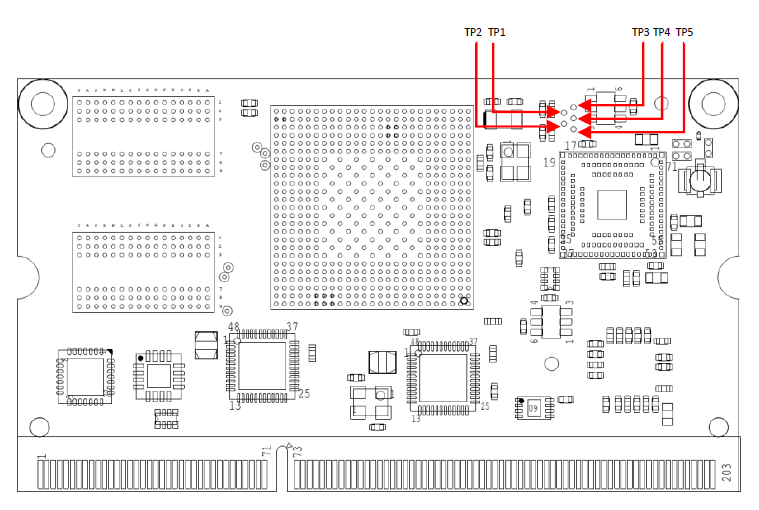
The JTAG Interface is exported through Test Points TP½/¾/5 on VAR-SOM-MX7
| TP | signal | description |
|---|---|---|
| TP1 | TMS | JTAG mode select |
| TP2 | TDI | JTAG data-in |
| TP3 | TDO | JTAG data-out |
| TP4 | TCK | JTAG clock |
| TP5 | TRST | JTAG reset |
Debugging GUI
The only GUI currently supported to debug Cortex M4 applications is Lauterbach TRACE32.
The script to attach TRACE32 is available here:
Make sure that TRACE32 ICD (In-Circuit-Debugger) for ARM is installed and the Lauterbach debugger device supports ARM Cortex-A7 and ARM Cortex-M4 debugging.
Build a FreeRTOS application for the target, and change the default ELF load path in attach_imx7d_m4.cmm line 115: data.load.elf "
Connect the TRACE32 debugger device to the computer and the board (through JTAG). Run the TRACE32 ICD ARM debugger, and load attach_imx7d_m4.cmm by choosing "File -> Run Batchfile".
Run (GO) and debug the program with the single step (Step, Over, Next, Return) or break points.