MCUXpresso 2.13.1
Overview
Release Notes
For full details about this release, refer to the Release Notes.
MCUXpresso SDK
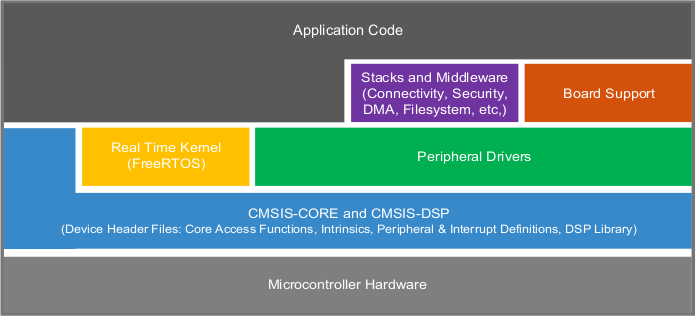
MCUXpresso SDK board support provides example applications for NXP development and evaluation boards for Arm Cortex-M cores. Board support packages are found inside of the top level boards folder, and each supported board has its own folder (MCUXpresso SDK package can support multiple boards). Within each
- cmsis_driver_examples: Simple applications intended to concisely illustrate how to use CMSIS drivers.
- demo_apps: Full-featured applications intended to highlight key functionality and use cases of the target MCU. These applications typically use multiple MCU peripherals and may leverage stacks and middleware.
- driver_examples: Simple applications intended to concisely illustrate how to use the MCUXpresso SDK’s peripheral drivers for a single use case.
- rtos_examples: Basic FreeRTOS OS examples showcasing the use of various RTOS objects (semaphores, queues, and so on) and interfacing with the MCUXpresso SDK’s RTOS drivers.
- multicore_examples: Simple applications intended to concisely illustrate how to use middleware/multicore stack.
Here we describe how to use ARM GCC toolchain, officially supported following Getting Started with MCUXpresso SDK for MCIMX93-EVK.pdf.
Prerequisites
Before starting, prepare a Yocto boot SD card (with kernel 6.1.1 or newer).
To allow the Cortex-M33 to access shared resources without experiencing Linux kernel conflicts, a dedicated device tree must be loaded, by selecting the right version with the symbolic link in the /boot folder of the booting media.
These device trees contain m33 label in their name.
The below table lists an example dtb blob file name for VAR-SOM-MX93 (on the Symphony Board) with support for the M33 for each kernel version / Yocto release:
|
File Name
|
Description
|
|---|---|
| imx93-var-som-symphony- m33 .dtb | VAR-SOM-MX93 (Rev 2.x+) device tree blob for kernel = 6.1.1 (Yocto Langdale) on Symphony-Board 1.4a and above. |
| imx93-var-som-1.x-symphony- m33 .dtb | VAR-SOM-MX93 (Rev 1.x) device tree blob for kernel = 6.1.1 (Yocto Langdale) on Symphony-Board 1.4a and above. |
This device tree disables some of the base device tree nodes in order to avoid conflicts between the Cortex-A55 processors and Cortex-M33.
For the full list of device tree blob files, refer to the "Build Results" section in the appropriate wiki page for the specific Yocto/Debian release you are using.
Installing required packages
Install cmake
Download and install GNU-ARM bare-metal toolchain:
$ mkdir ~/var-mcuxpresso
$ cd ~/var-mcuxpresso
$ wget https://developer.arm.com/-/media/Files/downloads/gnu-rm/10.3-2021.10/gcc-arm-none-eabi-10.3-2021.10-x86_64-linux.tar.bz2
$ tar xvf gcc-arm-none-eabi-10.3-2021.10-x86_64-linux.tar.bz2
Download MCUXpresso SDK for the SOM:
$ cd ~/var-mcuxpresso
$ git clone https://github.com/varigit/freertos-variscite -b mcuxpresso_sdk_2.13.x-var02
$ cd freertos-variscite
Documentation
Original NXP documentation is available online or in the following folder:
Demos pins
Default M33 pins used by the demos are:
| Function | SoC balls | VAR-SOM-MX93 Pins | Symphony Pins | Notes |
|---|---|---|---|---|
| UART7 RX/TX | M21 / M20 | J1.175 / J1.124 | J18.5 / J18.3 | |
| TPM6-CH3 - PWM Output or Input Capture | W21 | J1.69 | J18.2 | |
| CAN1 RX/TX | J17 / G17 | J1.46 / J1.44 | J16.18 / J16.20, CANL / CANH levels (CAN transceiver mounted!) | If enabled, CAN devices will no longer visible from Linux |
| LPSPI6 CS0/SCK/SDI/SDO | J21 / K21 / J20 / K20 | J1.39 / J1.43 / J1.41 / J1.45 | J16.4 / J16.2 / J16.6 / J16.8 | If enabled, SPI6 devices will no longer be visible from Linux |
| LPI2C7 SCL/SDA | L21 / L20 | J1.174 / J1.176 | J16.10 / J16.12 | If enabled, I2C7 devices will no longer be visible from Linux |
| GPIO GPIO4.28 | U4 | J1.75 | J17.6 | GPIO pin is 1.8V IO level! |
Available demos
All of the Variscite examples are located under the following folder
The available demos for VAR-SOM-MX93 are:
- demo_apps/ethosu_apps_rpmsg/ethosu_apps_rpmsg
- demo_apps/hello_world/hello_world
- driver_examples/canfd/efifo_interrupt_transfer/canfd_efifo_interrupt_transfer
- driver_examples/canfd/interrupt_transfer/canfd_interrupt_transfer
- driver_examples/canfd/loopback_transfer/canfd_loopback_transfer
- driver_examples/canfd/loopback/canfd_loopback
- driver_examples/canfd/ping_pong_buffer_transfer/canfd_ping_pong_buffer_transfer
- driver_examples/edma4/channel_link/edma4_channel_link
- driver_examples/edma4/interleave_transfer/edma4_interleave_transfer
- driver_examples/edma4/memory_to_memory/edma4_memory_to_memory
- driver_examples/edma4/memory_to_memory_transfer/edma4_memory_to_memory_transfer
- driver_examples/edma4/memset/edma4_memset
- driver_examples/edma4/ping_pong_transfer/edma4_ping_pong_transfer
- driver_examples/edma4/scatter_gather/edma4_scatter_gather
- driver_examples/edma4/wrap_transfer/edma4_wrap_transfer
- driver_examples/flexcan/efifo_interrupt_transfer/flexcan_efifo_interrupt_transfer
- driver_examples/flexcan/interrupt_transfer/flexcan_interrupt_transfer
- driver_examples/flexcan/loopback_edma_transfer/flexcan_loopback_edma_transfer
- driver_examples/flexcan/loopback_transfer/flexcan_loopback_transfer
- driver_examples/flexcan/loopback/flexcan_loopback
- driver_examples/flexcan/ping_pong_buffer_transfer/flexcan_ping_pong_buffer_transfer
- driver_examples/lpi2c/interrupt_b2b_transfer/master/lpi2c_interrupt_b2b_transfer_master
- driver_examples/lpi2c/interrupt_b2b_transfer/slave/lpi2c_interrupt_b2b_transfer_slave
- driver_examples/lpi2c/polling_b2b/master/lpi2c_polling_b2b_master
- driver_examples/lpi2c/polling_b2b/slave/lpi2c_polling_b2b_slave
- driver_examples/lpit/chained_channel/lpit_chained_channel
- driver_examples/lpit/single_channel/lpit_single_channel
- driver_examples/lpspi/interrupt_b2b/master/lpspi_interrupt_b2b_master
- driver_examples/lpspi/interrupt_b2b/slave/lpspi_interrupt_b2b_slave
- driver_examples/lpspi/interrupt_b2b_transfer/master/lpspi_interrupt_b2b_transfer_master
- driver_examples/lpspi/interrupt_b2b_transfer/slave/lpspi_interrupt_b2b_transfer_slave
- driver_examples/lpspi/polling_b2b/master/lpspi_polling_b2b_master
- driver_examples/lpspi/polling_b2b_transfer/slave/lpspi_polling_b2b_transfer_slave
- driver_examples/edma/memory_to_memory/dma3_memory_to_memory
- driver_examples/edma/scatter_gather/dma3_scatter_gather
- driver_examples/flexcan/loopback_transfer/flexcan_loopback_transfer
- driver_examples/flexcan/loopback/flexcan_loopback
- driver_examples/flexcan/ping_pong_buffer_transfer/flexcan_ping_pong_buffer_transfer
- driver_examples/flexcan/efifo_interrupt_transfer/flexcan_efifo_interrupt_transfer
- driver_examples/flexcan/interrupt_transfer/flexcan_interrupt_transfer
- driver_examples/rgpio/led_output/rgpio_led_output
- driver_examples/lpi2c/polling_b2b/master/lpi2c_polling_b2b_master
- driver_examples/lpi2c/polling_b2b/slave/lpi2c_polling_b2b_slave
- driver_examples/lptmr/lptmr
- driver_examples/lpuart/interrupt_rb_transfer/lpuart_interrupt_rb_transfer
- driver_examples/lpuart/interrupt_transfer/lpuart_interrupt_transfer
- driver_examples/lpuart/interrupt/lpuart_interrupt
- driver_examples/lpuart/polling/lpuart_polling
- driver_examples/tstmr/tstmr
- multicore_examples/rpmsg_lite_pingpong_rtos/linux_remote/rpmsg_lite_pingpong_rtos_linux_remote
- multicore_examples/rpmsg_lite_str_echo_rtos/rpmsg_lite_str_echo_rtos_imxcm33
- rtos_examples/freertos_event/freertos_event
- rtos_examples/freertos_generic/freertos_generic
- rtos_examples/freertos_hello/freertos_hello
- rtos_examples/freertos_lpi2c_b2b/master/freertos_lpi2c_b2b_master
- rtos_examples/freertos_lpi2c_b2b/slave/freertos_lpi2c_b2b_slave
- rtos_examples/freertos_lpspi_b2b/master/freertos_lpspi_b2b_master
- rtos_examples/freertos_lpspi_b2b/slave/freertos_lpspi_b2b_slave
- rtos_examples/freertos_mutex/freertos_mutex
- rtos_examples/freertos_queue/freertos_queue
- rtos_examples/freertos_sem/freertos_sem
- rtos_examples/freertos_swtimer/freertos_swtimer
Additional demos may be provided on this platform in a future release.
The Wi-Fi/Bluetooth module interfaces have been disabled in the M33 device tree to not conflict with certain demos, however, if the module is present on your SoM, you should also disable the Wi-Fi service from running in Linux via "systemctl disable variscite-wifi"
Almost all of the above demos are also available for MCIMX93-EVK.
You can build and run the demos following official NXP documentation for MCIMX93-EVK, available online or in the following document:
Building a demo
Building Manually
For any demo, follow these steps:
$ cd ~/var-mcuxpresso/freertos-variscite/boards/som_mx93
$ cd <demo_folder>
$ cd armgcc
$ export ARMGCC_DIR=~/var-mcuxpresso/gcc-arm-none-eabi-10.3-2021.10
$ ./build_all.sh > /dev/null
You can choose any
Then copy the ".bin" to the boot media (either the SD card or eMMC) in the /boot folder already hosting the Linux device trees.
Building Using Yocto
In Yocto Dunfell and newer, Variscite provides a Yocto recipe for building and installing firmware into the Yocto image. Note, the examples below apply to the original release of this recipe in Dunfell and thus some of the syntax (such as the overrides) may need to be updated for newer versions.
https://github.com/varigit/meta-variscite-fslc/tree/dunfell/recipes-bsp/freertos-variscite
This recipe installs the following firmware files:
| File | Memory | Loaded Using... |
|---|---|---|
| /boot/cm_<demo name>.bin.debug | TCM | U-Boot |
| /lib/firmware/cm_<demo name>.elf.debug | TCM | Linux Remoteproc Framework |
If you have modified freertos-variscite in your own Git repository and kept the same directory structure, you can easily build your custom firmware by creating a bbappend file:
$ mkdir -p <your-layer>/recipes-bsp/freertos-variscite
$ nano <your-layer>/recipes-bsp/freertos-variscite/freertos-variscite_2.9.x.bbappend
Append SRC_URI and SRCREV to use your freertos-variscite Git repository
# Yocto Hardknott and older
SRC_URI_remove = "git://github.com/varigit/freertos-variscite.git;protocol=git;branch=${MCUXPRESSO_BRANCH};"
SRC_URI_append = " <your Git repository>"

# Yocto Kirkstone and newer
SRC_URI:remove = "git://github.com/varigit/freertos-variscite.git;protocol=git;branch=${MCUXPRESSO_BRANCH};"
SRC_URI:append = " <your Git repository>

SRCREV = "<your Git commit id>"
Append CM_DEMOS to build your firmware. For example, to build rtos_examples/freertos_hello:
# Yocto Hardknott and older
CM_DEMOS_append = "rtos_examples/freertos_hello"

# Yocto Kirkstone and newer
CM_DEMOS:append = "rtos_examples/freertos_hello"
Rebuild fsl-image-gui:
The firmware binary files should now be installed to /boot/ and elf files to /lib/firmware/
Memory types
The SDK currently allows linking only out of TCM.
Below is a short summary of memory areas used by Cortex-M33 as described in related linker file:
| Memory Type | M33 Memory Area | A55 Memory Area | Memory Length | Linker File |
|---|---|---|---|---|
| TCM |
0x0FFE0000 - 0x0FFFFFFF (code)
0x20000000 – 0x2001FFFF (data) |
0x201E0000 – 0x201FFFFF (code)
0x20200000 – 0x2021FFFF (data) |
128kB (Code TCM) + 128kB (System TCM) | MIMX9352_cm33_ram.ld |
All linker files are located in the armgcc folder of each demo. Please consult the linker file for the actual memory used by each demo.
After launching the build_all.sh command the following folder will be created in the armgcc folder
- debug: containing TCM binaries compiled in debug mode (not stripped: symbols available)
- release: containing TCM binaries compiled in release mode (stripped: no symbols available)
Running a demo
Running a demo from U-Boot
To assist in loading M33 firmware from U-Boot prior to Linux boot, Variscite has created a dedicated set of U-Boot environment commands.
To allow Cortex-M accessing shared resources without experiencing Linux kernel conflicts, a dedicated device tree must be loaded.
To enable Cortex-M U-Boot auto-loading:
To disable Cortex-M U-Boot auto-loading:
Note that the Cortex A55s and M33 have a different memory addressing "view" that is documented in the reference manual. Additionally, the bootaux command for the M33 uses secure aliases from the M33's point of view. Thus, two variables must be set properly in order to set the loading address (defaults used in the example below):
To set the name of the Cortex-M binary
The .bin file is expected to exist in the directory /boot of the booting media.
After enabling as above, the U-Boot boot command will handle loading the Cortex-M firmware when the system begins the boot process. For testing, it is possible to invoke the Cortex-M33 boot process manually:
After booting in Linux, the M33 will be listed as in the "attached" state by remoteproc:
Additional details and step by step procedure to run each of the demos is available online or in the following document:
This process can be simplified using /etc/remoteproc/variscite-rproc-u-boot in Linux
Please refer to the Yocto Scripts section below for more information
Running a demo from Linux
The Linux remoteproc framework can be used to load the Cortex-M33 firmware from Linux userspace.
The U-Boot M33 auto-loading must not be currently enabled in order to allow for remoteproc control and loading of the M33.
Increase kernel loglevel while debugging:
If the state is 'running', stop the Cortex-M33
Load new firmware
The .elf file is expected to exist in the /lib/firmware directory
Run the new firmware
This process can be simplified using /etc/remoteproc/variscite-rproc-linux in Linux
Please refer to the Yocto Scripts section below for more information
By default, Linux disables unused clocks. Certain M33 examples may use peripherals which are not enabled in Linux. Depending on the clock source, Linux may disable the clock by default, resulting in the example/peripheral not functioning. Therefore, when running M33 examples, it is recommended to override this. The easiest way to achieve this is to append the bootarg "clk_ignore_unused."
Running a Demo using Yocto Scripts
In Yocto, Variscite provides scripts to simplify loading firmware via U-Boot or Linux:
| Script | Description |
|---|---|
| /etc/remoteproc/variscite-rproc-u-boot | Configure U-Boot to load firmware on boot |
| /etc/remoteproc/variscite-rproc-linux | Load and run firmware using Linux remoteproc framework |
Examples
variscite-rproc-u-boot example on imx93-var-som:
root@imx93-var-som:~# /etc/remoteproc/variscite-rproc-u-boot -f /boot/cm_hello_world.bin.release
Configuring for TCM memory
+ fw_setenv m33_addr 0x201E0000
Cannot read environment, using default
+ fw_setenv fdt_file imx93-var-som-symphony-m33.dtb
+ fw_setenv use_m33 yes
+ fw_setenv m33_bin cm_hello_world.bin.release
+ fw_setenv kernelargs ' clk_ignore_unused'
+ fw_setenv m33_addr_auxview 0x1FFE0000

Finished: Please reboot, the m33 firmware will run during U-Boot
variscite-rproc-linux example on imx93-var-som:
root@imx93-var-som:~# /etc/remoteproc/variscite-rproc-linux -f /lib/firmware/cm_hello_world.elf.release
Cortex-M: Loading cm_hello_world.elf.release
Cortex-M: Starting
[  974.434796] remoteproc remoteproc0: powering up imx-rproc
[  974.442420] remoteproc remoteproc0: Booting fw image cm_hello_world.elf.release, size 99776
[  974.451172] remoteproc remoteproc0: header-less resource table
Debugging a demo
JTAG Hardware
The Cortex-M firmware can be debugged using a JTAG debugger. Variscite recommends using a Segger J-Link Ultra+, J-Link Pro, or J-Link Wi-Fi debugger. You may also need a 9-pin Cortex-M adapter from Segger.
Note: If you encounter issues while using the ARM-JTAG-20-10 adapter from Olimex (such as the "TDO is constant high" error), you may need to leave pin 9 floating. This can be done by cutting the copper trace between the R2 pads, as indicated in the product page FAQ.
JTAG interface
The JTAG interface is not exposed directly on the VAR-SOM-MX93 but the associated signals are exposed via the J1 SOM connector, which are shown in the table below:
| Signal | SoC balls | VAR-SOM-MX93 Pins | Symphony Pins | Segger Adapter Pins |
|---|---|---|---|---|
| TCLK_SWCLK | Y1 | J1.51 | J18.8 | 9 |
| TDI | W1 | J1.53 | J18.6 | 5 |
| TDO_TRACESWO | Y2 | J1.52 | J18.4 | 13 |
| TMS_SWDIO | W2 | J1.50 | J18.10 | 7 |
| Vtref | J3.2 | 1 | ||
| GND | J3.20 | 4 |
These signals are shared with the Wi-Fi module if present, so usage will require disabling this interface and making any appropriate pin muxing adjustments.
Please refer to SoM datasheet for further details.