Part 1 - A Simple Client / Server Application
In this first part, we build a minimal client/server application that will serve as the foundation for the rest of this guide.
The implementation is intentionally simple and written in Python. To keep the focus on the communication flow and the security concepts introduced in later parts, error handling and edge cases are kept to a minimum.
The following diagram illustrates the basic setup.
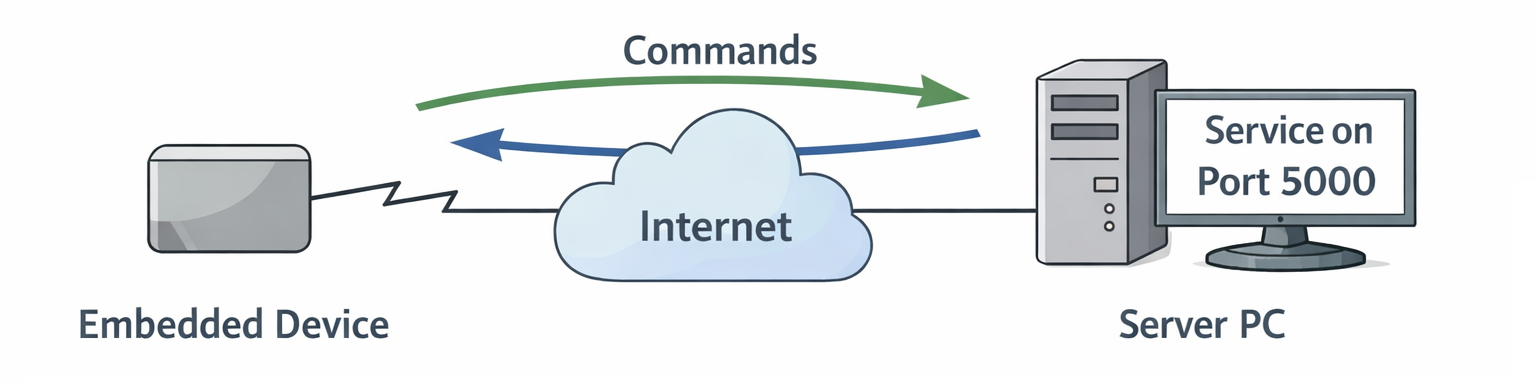
The server can run anywhere - on a development PC, in a data center, or in the cloud - as long as it is reachable from the embedded device over the network.
The server listens on TCP port 5000 and processes simple text-based commands.
The main command we care about is:
When the server receives this command, it returns a secret string to the client.
Server Implementation
Let's start by looking at the server:
#!/usr/bin/env python3
import socket
import threading

HOST = "0.0.0.0"
PORT = 5000

def handle_command(command: str) -> str:
    command = command.strip()

    if command == "GET_SECRET":
        return "THIS_IS_THE_SECRET"
    else:
        return "UNKNOWN_COMMAND"

def handle_client(conn: socket.socket, addr):
    """Handle one client connection."""
    print(f"[+] Connection from {addr}")

    with conn:
        while True:
            data = conn.recv(1024)
            if not data:
                break

            command = data.decode("utf-8")
            print(f"[{addr}] Received: {command.strip()}")

            response = handle_command(command)
            conn.sendall((response + "\n").encode("utf-8"))

    print(f"[-] Client disconnected: {addr}")

def main():
    with socket.socket(socket.AF_INET, socket.SOCK_STREAM) as server_sock:
        server_sock.bind((HOST, PORT))
        server_sock.listen()

        print(f"Server listening on {HOST}:{PORT}")

        while True:
            conn, addr = server_sock.accept()

            # One thread per client
            thread = threading.Thread(
                target=handle_client,
                args=(conn, addr),
                daemon=True
            )
            thread.start()

if __name__ == "__main__":
    main()
Key characteristics:
- The server listens on all interfaces (0.0.0.0) on port 5000.
- Each client connection is handled in its own thread.
- Commands are simple UTF-8 encoded strings.
- If the command is
GET_SECRET, the server responds withTHIS_IS_THE_SECRET.
This is deliberately straightforward so we can clearly observe what happens on the wire.
Client Implementation
Here is the corresponding client:
#!/usr/bin/env python3
import socket
import sys

SERVER_PORT = 5000

def main():
    if len(sys.argv) != 2:
        print(f"Usage: {sys.argv[0]} <server_ip_or_hostname>")
        sys.exit(1)

    server_host = sys.argv[1]

    with socket.socket(socket.AF_INET, socket.SOCK_STREAM) as sock:
        sock.connect((server_host, SERVER_PORT))

        command = "GET_SECRET\n"
        print(f"Sending: {command.strip()}")
        sock.sendall(command.encode("utf-8"))

        response = sock.recv(1024)
        print(f"Received: {response.decode('utf-8').strip()}")

if __name__ == "__main__":
    main()
The client:
- Connects to the specified server.
- Sends the GET_SECRET command.
- Prints the server's response.
Running the Example
The code runs on any system with Python 3 installed.
For demonstration purposes:
server.pyruns on a development PC (or later, a production server). For now it runs on192.168.178.2client.pyruns on the embedded device.
Starting the server:
$ chmod u+x server.py
$ ./server.py
Server listening on 0.0.0.0:5000
[+] Connection from ('127.0.0.1', 49956)
[('127.0.0.1', 49956)] Received: GET_SECRET
[-] Client disconnected: ('127.0.0.1', 49956)
Running the client:
At this point, everything works as expected. But from a security perspective, we have several serious issues.
Problem 1 - No Encryption
All communication is sent in clear text over the network.
If this traffic traverses public or otherwise untrusted infrastructure (e.g., the Internet), anyone with the ability to monitor traffic can read it.
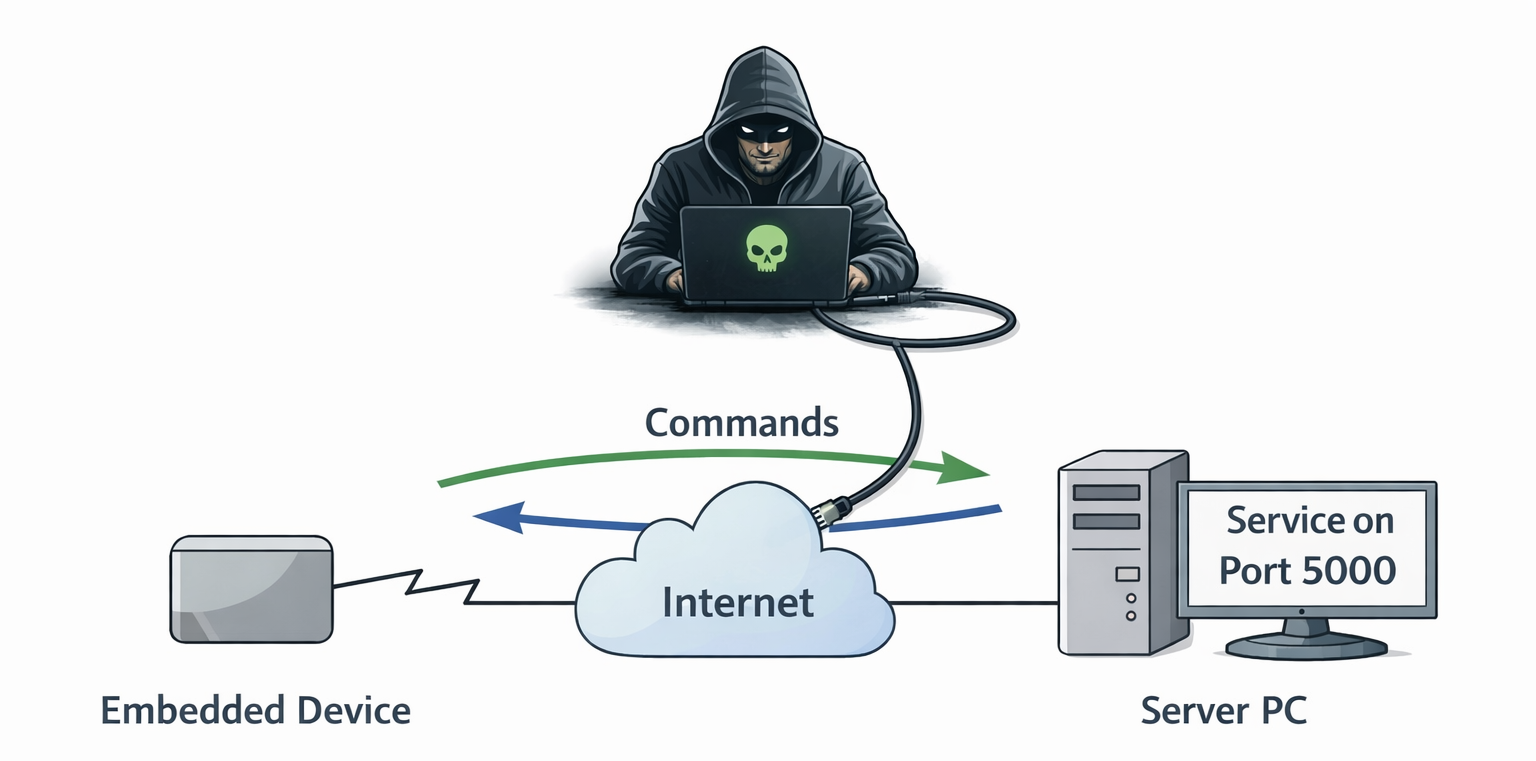
You can observe this yourself using tcpdump:
$ sudo tcpdump -i any host 192.168.178.2 -w capture.pcap
tcpdump: WARNING: any: That device doesn't support promiscuous mode
(Promiscuous mode not supported on the "any" device)
tcpdump: listening on any, link-type LINUX_SLL2 (Linux cooked v2), snapshot length 262144 bytes
# Press Ctrl + C to abort
^C17 packets captured
17 packets received by filter
0 packets dropped by kernel
Then run the client.py again. You need to abort the tcpdump process with Ctrl+C.
You can either have a look at the resulting capture.pcap file with Wireshark if you prefer a GUI, or you can use the command line to browse the packet content.
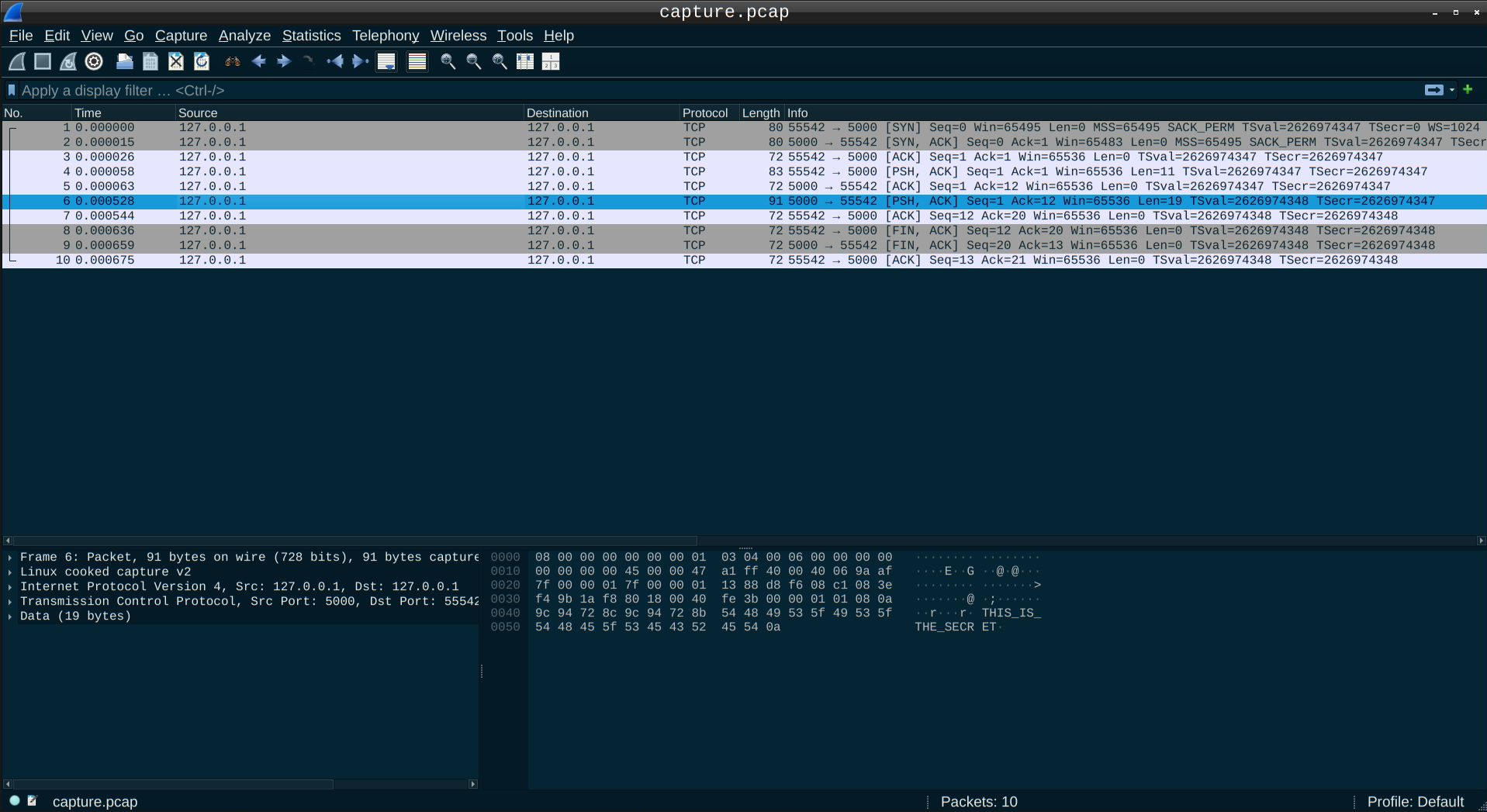
$ tcpdump -r capture.pcap -s0 -A | grep SECRET -C 3
[..]
18:55:23.442244 lo    In  IP napier.commplex-main > napier.53388: Flags [P.], seq 1:20, ack 12, win 64, options [nop,nop,TS val 2304605798 ecr 2304605797], length 19
E..G`.@[email protected]=P.d...@.......
.]~f.]~eTHIS_IS_THE_SECRET
[..]
The "secret" is clearly visible in the packet payload.
Any attacker capable of sniffing the traffic can read it. Over networks you do not control, you cannot assume confidentiality.
Problem 2 - No Server Authentication
The client blindly trusts that the server it connects to is legitimate.
If an attacker manages to redirect traffic (for example, via DNS spoofing, ARP poisoning, or routing manipulation), the client may connect to a malicious server instead.
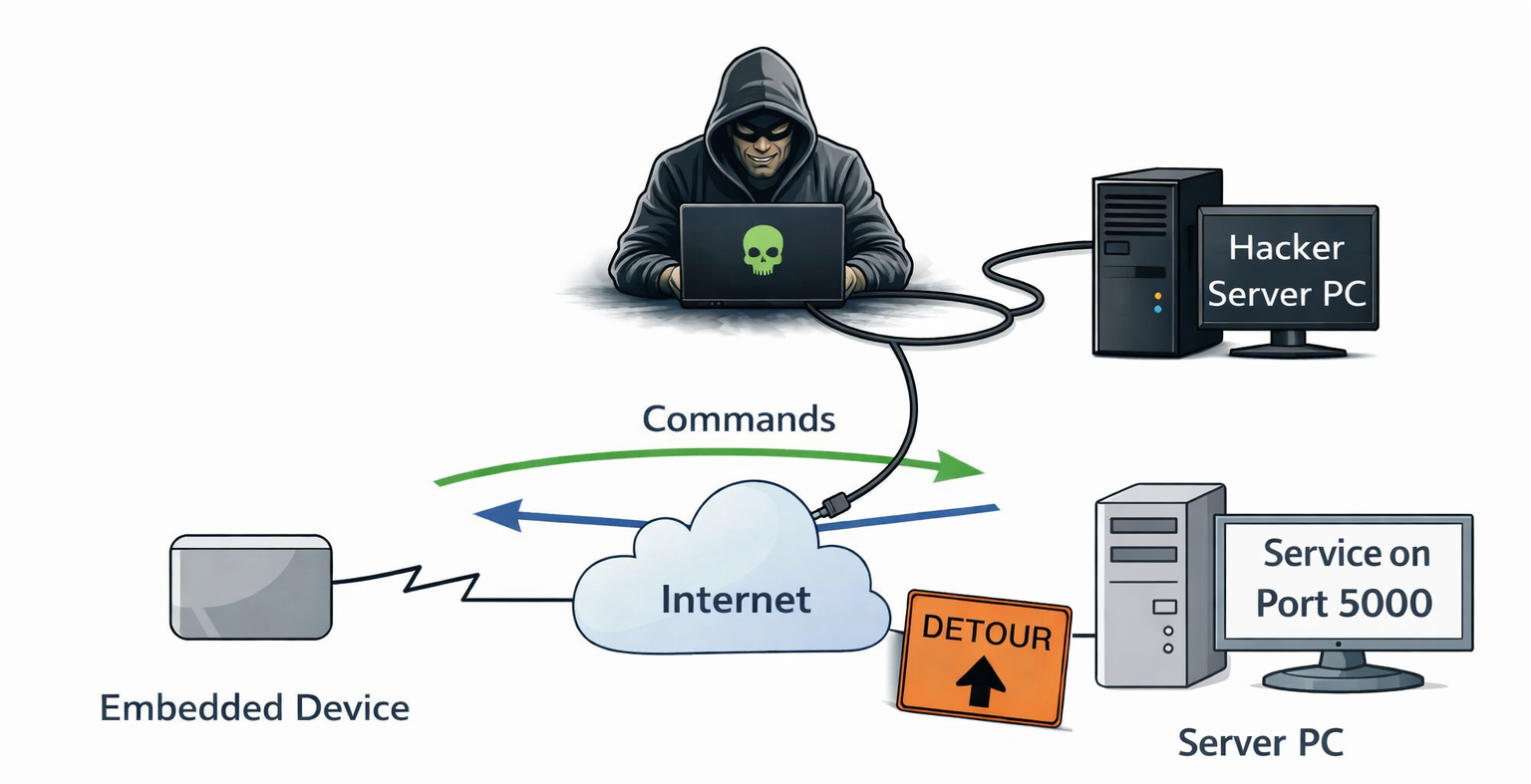
From the client's perspective, the TCP connection succeeded. There is no mechanism to verify the server's identity.
Problem 3 - No Data Verification
The data sent between the server and the client cannot be verified. An attacker might replace some packet data during the transmission and neither the server nor the client could detect that.
Problem 4 - No Client Authentication
The server also has no way to verify who is connecting.
If someone clones your embedded product and connects to your backend infrastructure, the server cannot distinguish between:
- A legitimate device
- A cloned or unauthorized device
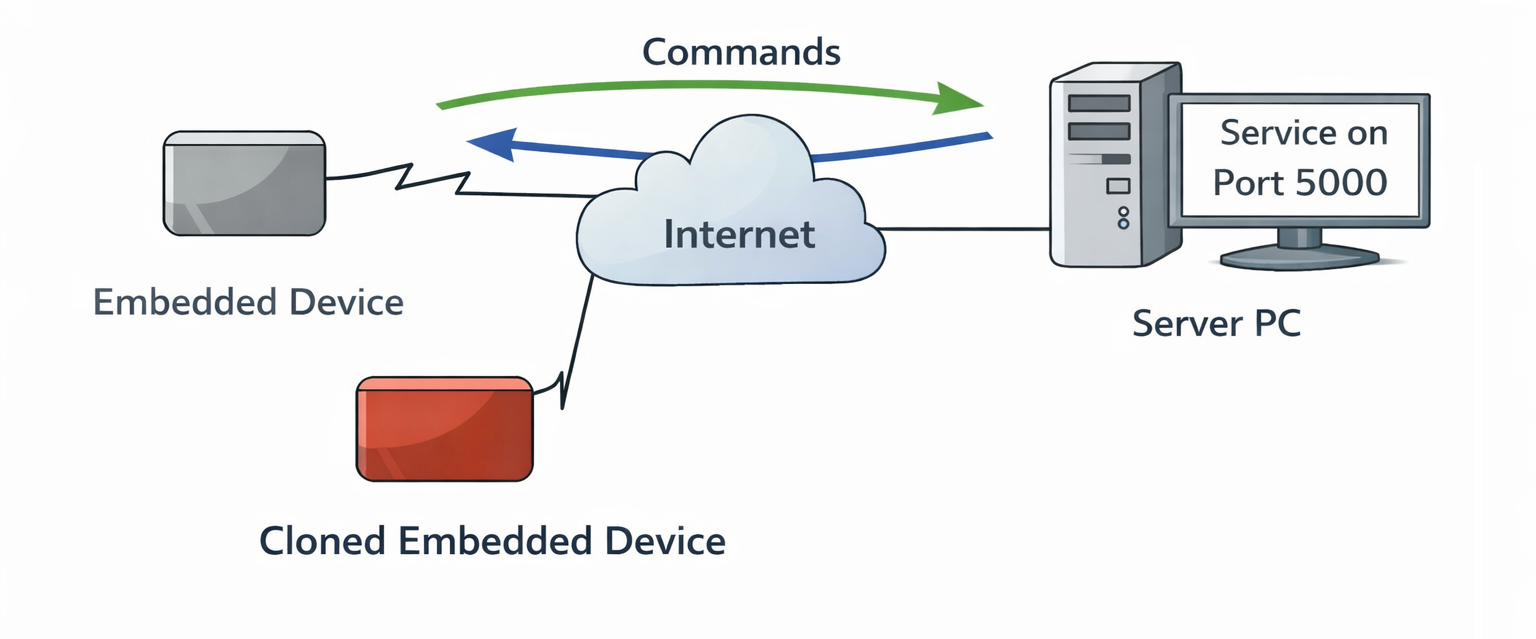
This is particularly relevant in commercial or industrial deployments, where device identity and protection against cloning are critical.
What's Next?
To address these issues, we need:
- Confidentiality (encryption)
- Data Verification
- Server authentication
- Client Authentication
In the next part, we introduce TLS to encrypt communication and authenticate the server: 👉 Part 2 – Adding Encryption, Authentication and Verification