Part 3 - Client Side Authentication
In the previous part, we added TLS to our connection. That already gives us three important security properties:
- Encryption (confidentiality): The communication is no longer sent in clear text, so passive attackers can't read it.
- Integrity (tamper detection): Data cannot be modified in transit without the receiver noticing.
- Server authentication: The client can verify that it is talking to the expected server (and not an impostor).
So far, the client can confirm the server's identity - but the server cannot (yet) confirm the client's identity.
Now assume you build and sell an embedded device that communicates with a backend service. The device might be resource-constrained, while much of the value lives in the server infrastructure (data, algorithms, paid features, APIs, etc.). In that case, you typically want to ensure that only your own devices can use that infrastructure — not clones or PCs emulating your software.
To achieve this, we add client-side authentication, using mutual TLS (mTLS).
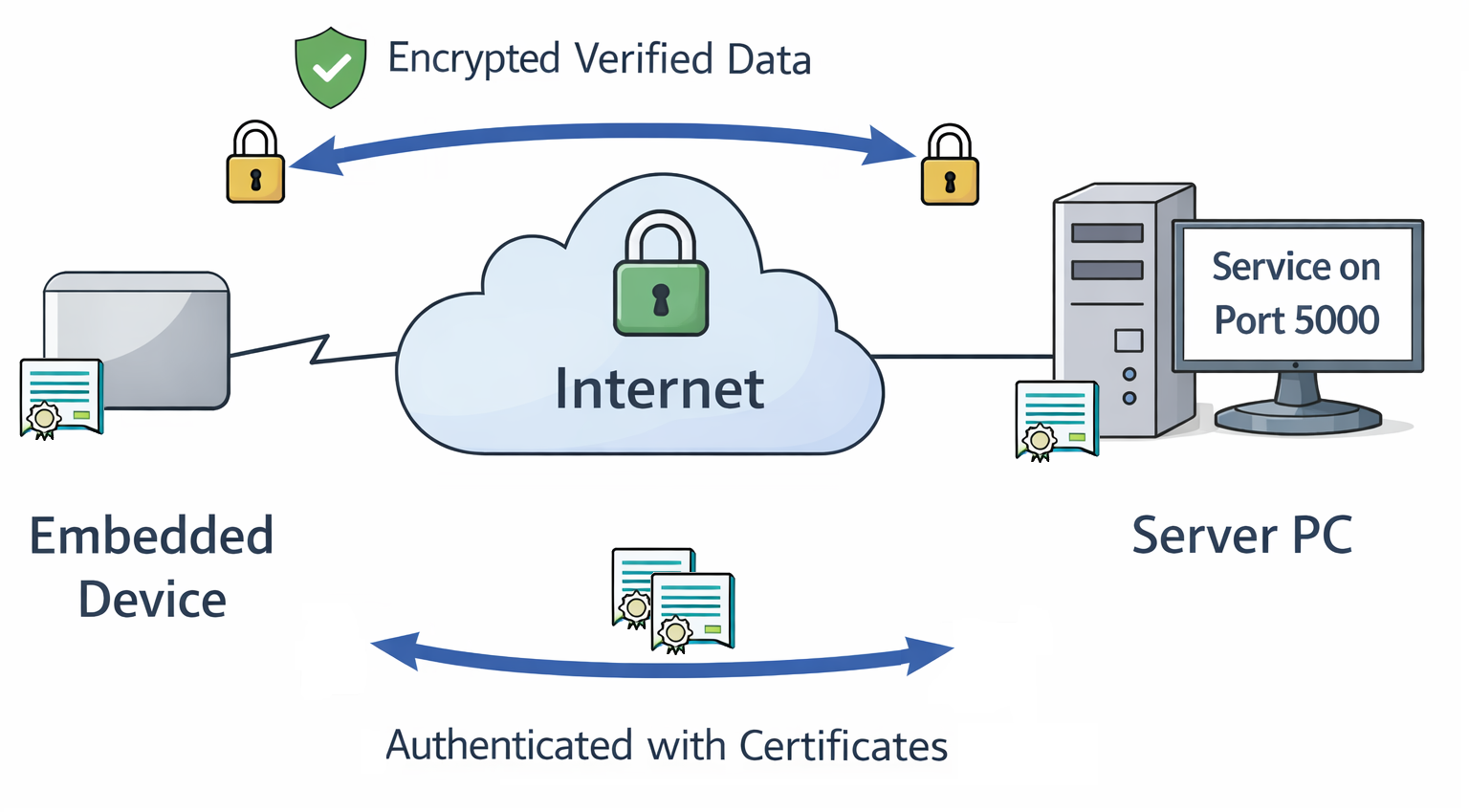
How Client Authentication Works
Client authentication uses the same building blocks as server authentication:
- A certificate signed by a trusted CA
- A private key corresponding to that certificate
With server authentication, the server presents a CA-signed certificate to the client.
With mutual TLS, the client also presents a CA-signed certificate to the server.
Depending on your use case, the server and client certificates can be signed by:
- the same CA, or
- different CAs (common in production setups)
For simplicity, we reuse the CA created in Part 2.
ℹ️ In a real product, you will likely use a dedicated device CA and a more structured provisioning process.
One Certificate or Many?
On the server side, the model is straightforward: there is typically one server endpoint (or a small set), so you provision a corresponding set of server certificates.
On the client side, you usually have many devices, so you need to decide what your identity model should look like:
- Should all devices share the same client certificate?
- Should devices share a certificate per production batch?
- Should product variants use different certificates?
- Should every device have a unique certificate?
In this example, we create one client certificate. You can either deploy it to multiple devices for testing, or repeat the process to generate per-device certificates. We'll revisit deployment strategies in more detail in Part 4
Creating the Client Certificate
1. Generate the client private key
Similar to the server setup, we'll use an EC NIST P-256 key:
2. Create a minimal Certificate Signing Request (CSR)
We create a CSR with a simple Common Name (CN). For development, this is sufficient. For public CAs (or stricter enterprise policies), you may need additional subject fields and extensions - consult your CA requirements.
3. Sign the client certificate with the CA
For our test setup we will reuse We reuse the CA created in Part 2.
In a final product you will send your CSR to the corporate or public CA instead.
For our test setup you will need:
client.csr- the CSRca.crt- the CA certificateca.key- the CA private key
$ openssl x509 -req \
  -in client.csr \
  -CA ca.crt -CAkey ca.key -CAcreateserial \
  -out client.crt -days 365 -sha256 \
  -extfile - < /dev/stdin << 'EOF'
basicConstraints=CA:FALSE
keyUsage=critical,digitalSignature
extendedKeyUsage=clientAuth
EOF

# Here starts output from the command
Certificate request self-signature ok
subject=CN=trusted-client
Code Changes
Client: Presenting a Certificate
In client.py, we load the client certificate and private key into the TLS context:
SERVER_CA = "server_ca.pem" # CA that signed server cert
CLIENT_CERT = "client.crt"
CLIENT_KEY = "client.key"

def main():
[..]

  context = ssl.create_default_context(ssl.Purpose.SERVER_AUTH)
  context.load_verify_locations(cafile=SERVER_CA)

  # Present client certificate
  context.load_cert_chain(
    certfile=CLIENT_CERT,
    keyfile=CLIENT_KEY
  )
Everything else remains unchanged.
Server: Requiring Client Certificates
On the server side, we configure TLS to require a client certificate and verify it against a CA:
SERVER_CERT = "server.crt"
SERVER_KEY = "server.key"
CLIENT_CA = "client_ca.pem" # CA that signed client certs

def main():
  context = ssl.SSLContext(ssl.PROTOCOL_TLS_SERVER)

  context.load_cert_chain(
    certfile=SERVER_CERT,
    keyfile=SERVER_KEY
  )


  # Require client certificates
  context.verify_mode = ssl.CERT_REQUIRED
  context.load_verify_locations(cafile=CLIENT_CA)
Running the Code
Server:
$ ./server.py
TLS server listening on 0.0.0.0:5000
[+] TLS connection from ('192.168.178.2', 45336)
    Cipher: ('TLS_AES_256_GCM_SHA384', 'TLSv1.3', 256)
[('192.168.178.2', 45336)] Received: GET_SECRET
[-] Client disconnected: ('192.168.178.2', 45336)
Client:
What happens without a client certificate?
If you use the client from Part 2 (no certificate configured), the handshake fails:
Server:
Client:
What happens with an untrusted client certificate?
If the client presents a certificate not signed by the configured CA:
Server:
ssl.SSLCertVerificationError: [SSL: CERTIFICATE_VERIFY_FAILED] certificate verify failed: self-signed certificate in certificate chain
Client:
Server: Inspecting Client Identity
For server certificates, we typically validate that the certificate matches the server's hostname/IP. For client certificates, that kind of "location check" doesn't make sense: clients move networks, may sit behind NAT and often don't have stable public identities.
Of course if you have used dedicated device CAs during provisioning then you can already use the different CAs to identify clients.
Furthermore, we can inspect identity fields inside the client certificate - in this
demo we used a very simple CN=trusted-client.
On the server, we can retrieve and inspect the peer certificate:
def handle_client(conn: ssl.SSLSocket, addr):
    client_cert = conn.getpeercert()
    print(f"[+] TLS connection from {addr}")
    print(f"    Cipher: {conn.cipher()}")
    print(f"    Client cert subject: {client_cert.get('subject')}")

    # Example authorization decision
    cn = None
    for item in client_cert.get("subject", []):
        if item[0][0] == "commonName":
            cn = item[0][1]

    if cn != "trusted-client":
        print("[-] Unauthorized client")
        conn.close()
        return

    with conn:
        while True:
            data = conn.recv(1024)
            if not data:
                break

            command = data.decode("utf-8")
            print(f"[{addr}] Received: {command.strip()}")

            response = handle_command(command)
            conn.sendall((response + "\n").encode("utf-8"))

    print(f"[-] Client disconnected: {addr}")
Example server output:
$ ./server.py
TLS server listening on 0.0.0.0:5000
[+] TLS connection from ('192.168.178.2', 47766)
 Cipher: ('TLS_AES_256_GCM_SHA384', 'TLSv1.3', 256)
 Client cert subject: ((('commonName', 'trusted-client'),),)
[('192.168.178.2', 47766)] Received: GET_SECRET
[-] Client disconnected: ('192.168.178.2', 47766)
Conclusion
At this point, we have a functional client/server setup with mutual TLS:
- Part 1: Plain TCP, clear-text traffic.
- Part 2: TLS encryption + integrity + server authentication.
- Part 3: Mutual TLS (mTLS): the server can authenticate the client.
This looks secure - as long as the sensitive material remains protected.
On the client, the key files are:
server_ca.pem- Used to validate the server certificate. This contains no secret and is often distributable.client.crt- The client certificate. It is sent during the handshake and is considered public.client.key- The client private key. This is highly sensitive. If an attacker obtains it, they can impersonate your device - exactly what client authentication is meant to prevent.
In the next part we will look at how a TPM can protect
client.key.