MCU-PLUS-SDK 11_00_00_16
Overview
Release Notes
For full details about this release, refer to the Release Notes.
MCU-PLUS-SDK 11_00_00_16 for AM62PX
This SDK contains examples, libraries and tools to develop RTOS and no-RTOS based applications for ARM R5F MCUs and related peripherals. The Cortex-R5F supported MCUs are WKUP_R5FSS (named also DM-R5F) and MCU_R5FSS (named also MCU-R5F). The WKUP_R5FSS is a single-core implementation of the Arm® Cortex®-R5F processor that acts as the Device Manager responsible for boot, resource management, and power management functions. The MCU_R5FSS is an Arm® Cortex®-R5F based subsystem that can run safety processing or be used as a general purpose MCU.
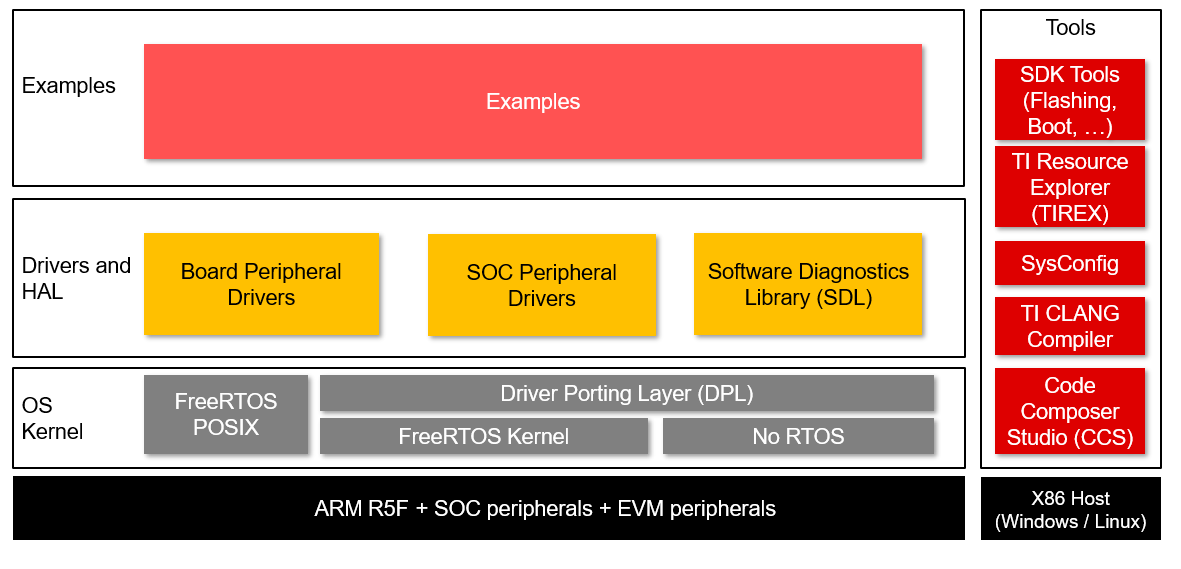
The examples and demos supported from TI are arranged as below
~/mcu-plus-sdk-am62px/examples/{optional component or module}/{optional sub-module or sub-component}/{example name}/{board on which this example can run}/{cpu}_{os}/{compiler toolchain}
For example referring to ipc_rpmsg_echo_linux for VAR-SOM-AM62P
{optional component or module}: e.g. driver
{optional sub-module or sub-component}: e.g. ipc
{example name}: e.g. ipc_rpmsg_echo_linux
{board on which this example can run}: am62px-var-som
{cpu}_{os}: e.g. mcu-r5fss0-0
{compiler toolchain}: ti-arm-clang
For more details please see TI Examples and Demos
To see the examples supported by Variscite, please look at the table Available demos:
Documentation
MCU-PLUS-SDK
Available online from TI AM62Px MCU+ SDK
Locally starting documentation server
$ cd ~/mcu-plus-sdk-am62px
$ python3 -m http.server 8080 &
Open web browser to "http://<ip where documentation server is running>:8080/docs/api_guide_am62px/index.html"
Other useful informations
Prerequisites
Before starting, prepare a Yocto boot SD card.
To allow Cortex R5F MCUs accessing shared resources without experiencing Linux kernel conflicts, a dedicated device tree must be loaded, containing r5 label in the name, using the fdtfile environment variable in U-Boot.
This device tree disables some of the base device tree nodes in order to avoid conflicts between the main processor and Cortex R5F MCUs.
Installing required packages
Download and install Sysconfig:
$ cd /tmp
$ wget https://software-dl.ti.com/ccs/esd/sysconfig/sysconfig-1.23.0_4000-setup.run
$ chmod +x sysconfig-1.23.0_4000-setup.run
$ ./sysconfig-1.23.0_4000-setup.run and install to ~/ti/sysconfig_1.23.0
$ rm sysconfig-1.23.0_4000-setup.run
Download and install TI CLANG Compiler Toolchain:
$ cd /tmp
$ wget https://dr-download.ti.com/software-development/ide-configuration-compiler-or-debugger/MD-ayxs93eZNN/4.0.1.LTS/ti_cgt_armllvm_4.0.1.LTS_linux-x64_installer.bin
$ sudo chmod +x ti_cgt_armllvm_4.0.1.LTS_linux-x64_installer.bin
$ ./ti_cgt_armllvm_4.0.1.LTS_linux-x64_installer.bin and install to ~/ti/ti-cgt-armllvm_4.0.1.LTS
$ rm ti_cgt_armllvm_4.0.1.LTS_linux-x64_installer.bin
Download MCU-PLUS-SDK for the SOM:
$ mkdir ~/mcu-plus-sdk-am62px
$ cd ~/mcu-plus-sdk-am62px
$ git clone https://github.com/varigit/ti-mcu-plus-sdk -b mcu_plus_sdk_am62px_11_00_00_16_var01 ~/mcu-plus-sdk-am62px
Demos pins for MCU-R5F
Default MCU-R5F pins used by the demos are:
| Desc | Function | SoC balls | VAR-SOM-AM62P pins | Symphony pins | Notes |
|---|---|---|---|---|---|
| UART | UART2 RXD/TXD | AC25/AB25 | J1.115/J1.171 | J18.7/J18.9 | |
| ECAP APWM | ECAP2_IN_APWM_OUT | E25 | J1.41 | J16.6 | |
| EPWM | EHRPWM0_A | G23 | J1.39 | J16.4 | |
| GPIO Input | MCU_GPIO0_3 | B11 | J1.151 | J13.21 | HDMI to header connector adapter is required |
| GPIO Output | GPIO1_7 | D25 | J1.45 | J16.8 | |
| MCAN | MCU_MCAN0_RX/MCU_MCAN0_TX | D6/E8 | J1.155/J1.157 | J13.16/J13.18 | HDMI to header connector adapter is required |
| SPI | MCU_SPI0_CLK/MCU_SPI0_D0/MCU_SPI0_D1/MCU_SPI0_CS1 | C10/B11/D10/E10 | J1.150/J1.151/J1.152/J1.153 | J13.17/J13.21/J13.15/J13.23 | HDMI to header connector adapter is required |
Demos pins for DM-R5F
Default DM-R5F pins used by the demos are:
| Desc | Function | SoC balls | VAR-SOM-AM62P pins | Symphony pins | Notes |
|---|---|---|---|---|---|
| UART | WKUP_UART0_RXD/WKUP_UART0_TXD | D8/D7 | J1.145/J1.147 | J3.8/J3.9 | |
| EPWM | EHRPWM0_A | G23 | J1.39 | J16.4 | |
| GPIO Input | MCU_GPIO0_3 | B11 | J1.151 | J13.21 | HDMI to header connector adapter is required |
| GPIO Output | GPIO1_7 | D25 | J1.45 | J16.8 | |
| MCAN | MCU_MCAN0_RX/MCU_MCAN0_TX | D6/E8 | J1.155/J1.157 | J13.16/J13.18 | HDMI to header connector adapter is required |
| SPI | MCU_SPI0_CLK/MCU_SPI0_D0/MCU_SPI0_D1/MCU_SPI0_CS1 | C10/B11/D10/E10 | J1.150/J1.151/J1.152/J1.153 | J13.17/J13.21/J13.15/J13.23 | HDMI to header connector adapter is required |
Available demos
All of the Variscite examples are located under the following folders
~/mcu-plus-sdk-am62px/examples/{component or module}/{optional sub-module or sub-component}/{example name}/am62px-var-som/{cpu}_{os}/{compiler toolchain}
The available demos for VAR-SOM-AM62P are:
- drivers/ddr/ddr_perf
- drivers/ecap/ecap_apwm_mode
- drivers/ecap/ecap_epwm_loopback
- drivers/epwm/epwm_duty_cycle
- drivers/gpio/gpio_input_interrupt
- drivers/gpio/gpio_led_blink
- drivers/ipc/ipc_notify_echo
- drivers/ipc/ipc_rpmsg_echo
- drivers/ipc/ipc_rpmsg_echo_linux
- drivers/mcan/mcan_loopback_interrupt
- drivers/mcan/mcan_loopback_polling
- drivers/mcspi/mcspi_loopback
- drivers/mcspi/mcspi_performance_32bit
- drivers/mcspi/mcspi_performance_8bit
- drivers/pmic/pmic_qa_watchdog_interrupt
- drivers/pmic/pmic_qa_watchdog_reset
- drivers/pmic/pmic_trigger_watchdog_interrupt
- drivers/pmic/pmic_trigger_watchdog_reset
- drivers/pmic/pmic_user_reg_cfg
- drivers/rtc/rtc_led_blink
- drivers/sciclient/sciclient_get_version
- drivers/uart/uart_echo
- drivers/uart/uart_echo_callback
- drivers/uart/uart_echo_low_latency_interrupt
- drivers/uart/uart_echo_low_latency_polling
- drivers/udma/udma_chaining
- drivers/udma/udma_memcpy_interrupt
- drivers/udma/udma_memcpy_polling
- drivers/udma/udma_sw_trigger
- empty
- hello_world
- hello_world_cpp
- kernel/dpl/dpl_demo
- kernel/freertos/dhrystone_benchmark
- kernel/freertos/posix_demo
- kernel/freertos/task_switch
- security/fwl_exception_trigger
- security/fwl_exception_log
- security/tisci_msg
The folders am62px-sk is related to the examples for TI Starter Kit.
You can build and run the demos following official TI documentation:
Using SDK with makefiles Build Hello World example
Building a demo using makefiles
Note: The Linux SDK provide an pre-built example (ipc_rpmsg_echo_linux) that on a target file system is soft linked by am62p-mcu-r5f0_0-fw.
# cd /lib/firmware
# ls -la /lib/firmware
lrwxrwxrwx 1 root root 74 Mar 9 2018 am62p-mcu-r5f0_0-fw -> /usr/lib/firmware/ti-ipc/ipc_rpmsg_echo_linux.mcu-r5f0_0.release.strip.out
We will use ipc_rpmsg_echo_linux as example to explain building procedure.
Building ipc_rpmsg_echo_linux for MCU-R5F
$ cd ~/mcu-plus-sdk-am62px
$ export PROJDIR=examples/drivers/ipc/ipc_rpmsg_echo_linux/am62px-var-som/mcu-r5fss0-0_freertos/ti-arm-clang/
$ make -s -C ${PROJDIR} clean
$ make -s -C ${PROJDIR}
This produces the R5F binary ${PROJDIR}/ipc_rpmsg_echo_linux.mcu-r5f0_0.release.strip.out for RTOS OS
Building ipc_rpmsg_echo_linux for DM-R5F
$ cd ~/mcu-plus-sdk-am62px
$ export PROJDIR=examples/drivers/ipc/ipc_rpmsg_echo_linux/am62px-var-som/mcu-r5fss0-0_freertos/ti-arm-clang/
$ make -s -C ${PROJDIR} clean
$ make -s -C ${PROJDIR}
This produces the R5F binary ${PROJDIR}/ipc_rpmsg_echo_linux.wkup-r5f0_0.release.strip.out for RTOS OS
Running a demo
Booting MCU-R5F from linux user space using remoteproc
Note: The remoteproc driver is hard-coded to look for specific files (am62p-mcu-r5f0_0-fw) when loading the MCU-R5F core.
The (am62p-mcu-r5f0_0-fw) is a link to /usr/lib/firmware/ti-ipc/ipc_rpmsg_echo_linux.mcu-r5f0_0.release.strip.out. The user can link (am62p-mcu-r5f0_0-fw) to a new firmware that will be loaded and ran at boot.
However, to make it easier to run an example during the development without the need to restart the target:
  # cd ~/mcu-plus-sdk-am62px
  # scp ${PROJDIR}/ipc_rpmsg_echo_linux.mcu-r5f0_0.release.strip.out root@<target ip>:/lib/firmware
On the target:
  # echo stop > /sys/class/remoteproc/remoteproc0/state
  # echo ipc_rpmsg_echo_linux.mcu-r5f0_0.release.strip.out > /sys/class/remoteproc/remoteproc0/firmware
  # echo start > /sys/class/remoteproc/remoteproc0/state
Testing ipc_rpmsg_echo_linux for MCU-R5F
Run rpmsg_char_simple application from Linux userspace to test inter-processor communication (IPC) between Cortex-A and MCU-R5F core.
Usage: rpmsg_char_simple [-r <rproc_id>] [-n <num_msgs>] [-d <rpmsg_dev_name] [-p <remote_endpt]
    Defaults: rproc_id: 0 num_msgs: 100 rpmsg_dev_name: NULL remote_endpt: 14

For remote proc ids, please refer to : 'https://git.ti.com/cgit/rpmsg/ti-rpmsg-char/tree/include/rproc_id.h'
Flashing and booting DM-R5F examples through SPL
Attention!: Be very careful to use DM-R5F for user app. It is recommended to use MCU-R5F instead.
Prerequisites
As the DM-R5F is the device manager, it needs to be updated and started by the SPL. It can not be loaded through linux user space using remoteproc.
Building U-Boot is required. Please referring to Yocto Build U-Boot from source code guide
The DM-R5F example updates do not require rebuilding U-Boot; it is sufficient to build and fhash only tispl.
Build tispl with ipc_rpmsg_echo_linux example:
  $ cd $UBOOT_DIR
  $ export DMR5F_BIN_PATH=${PROJDIR}/ipc_rpmsg_echo_linux.wkup-r5f0_0.release.strip.out
  $ make -j8 ARCH=arm CROSS_COMPILE=aarch64-none-linux-gnu- BL31=$TFA_DIR/build/k3/lite/release/bl31.bin TEE=$OPTEE_DIR/out/arm-plat-k3/core/tee-pager_v2.bin TI_DM=${DMR5F_BIN_PATH} O=$UBOOT_DIR/out/a53 BINMAN_INDIRS=$TI_LINUX_FW_DIR
Flashing DM-R5F
$ scp $UBOOT_DIR/out/a53/tispl.bin root@<target ip address>:/run/media/boot-mmcblk0p1 or cp $UBOOT_DIR/out/a53/tispl.bin on /media/$USER/boot
Useful documentation image-formats
Booting R5F-MCU
To boots the new flashed DM-R5F firmware rebooting the target is need
=> reset command from U-Boot prompt
press RST key
power off/on cycle
Testing ipc_rpmsg_echo_linux for DM-R5F
Run rpmsg_char_simple application from Linux userspace to test inter-processor communication (IPC) between Cortex-A and DM-R5F core.